[VIDEO] How to Sync Stripe With Workiom?
Status: Closed · Asked by Edwin on · 0 views
Back again ?
This video only shows 1 Workiom action - Update record.
But I also tried using other Workiom actions prior to using this action: "Find a record" and "Get List Records".
Note - I have never used workiom.
From video I am understanding that Update Record action required unique ID of the record you want to update.
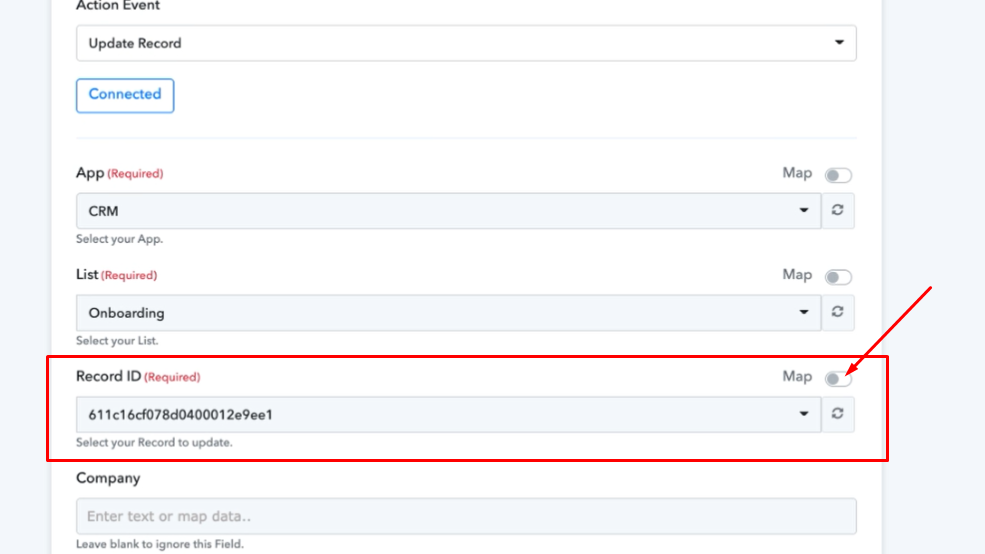
I think so you will be getting that Unique Recor ID as a Response Received when you try Find A Record action of workiom.
Map that unique ID to Update Record Action by toggle on the Map as shown in above screenshot and you should be good to go.
This way it will get the Search for the record in the workiom using email id and get Unique Record ID. Then it will update that particular record using that dynamically mapped Record ID.
thx for your quick reply! Unfortunately, that's not working either. I'll upload a new video today where you can see this in action :ninja:
Hey @Edwin
We have created a clone of your workflow and added a step of "Find a Record " to get the Record ID. Further the "Company field" is also required and needs to be filled out.
Further, to find and update a record on the basis of the email ID, the email ID has to be already present in the List.
Please check out the following step for better understanding -
Workflow Name - CLONE - [Start Onboarding]
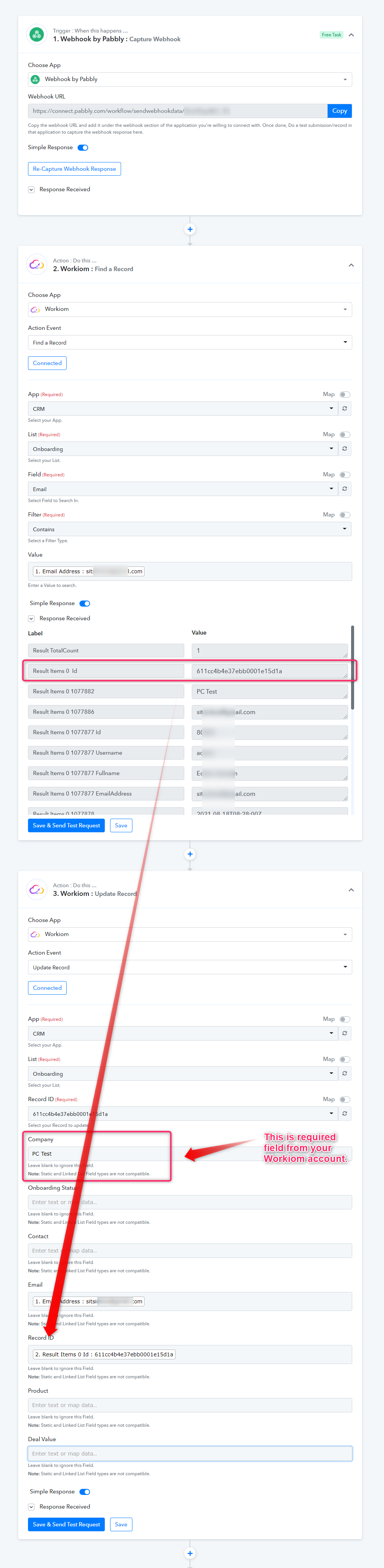
@Supreme Verma + @Fagun Shah
Thank you for providing help. I do understand that record IDs are necessary in order for their records to be changed. But my initial problem still remains: new customer details are replaced with old customer details.
Here's my evidence :D > https://www.loom.com/share/44d9da8074cf40e8ac669ef121db19f0
Note: regarding the Workom action: Update record, I also selected Stripe to map out the fields, although that shouldn't work because it makes no sense. Just wanted to test it as well. Anyway, as expected, this didn't work either.
At 2.12 minutes you state that the id is the same, so thats cool. NO.
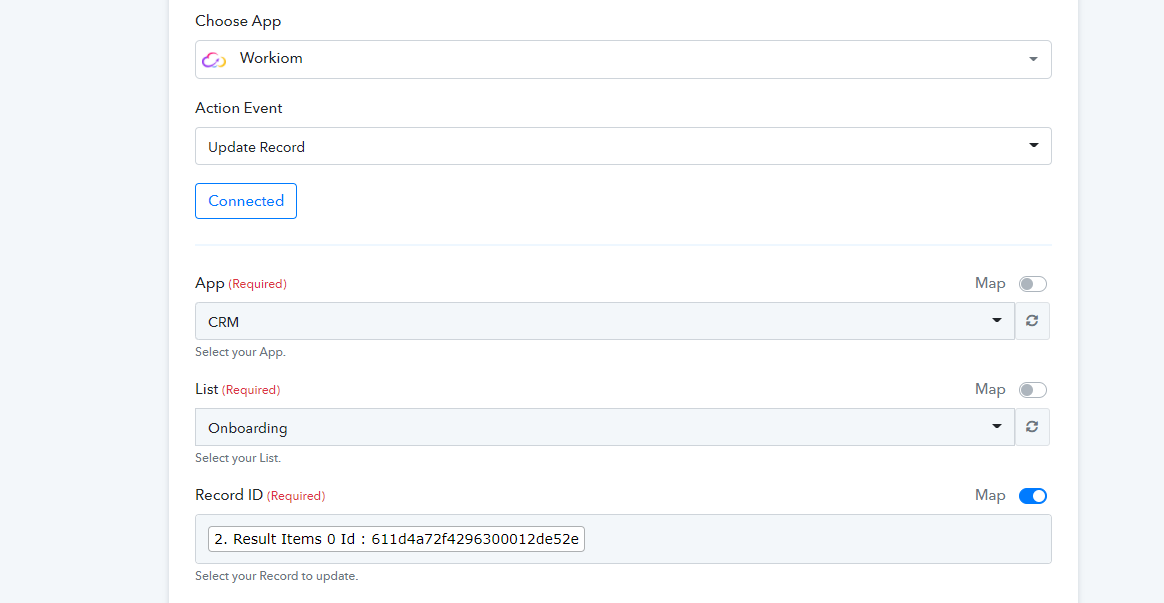
You need to overwrite that with the result from step 1, otherwise it's not dynamic.
Hey @Edwin
We have remapped the Update Record fields and re-map the Record ID too. So now it will not overwrite on the same record.
Please try again at your end and I hope this might help you.
Thanks!
Thanks @Hermes and @Supreme Verma!! Will test today :)
Hey @EdwinWe have remapped the Update Record fields and re-map the Record ID too. So now it will not overwrite on the same record.
Please try again at your end and I hope this might help you.
Thanks!
Works like a charm! At first, I didn't see your mapping update. Did a hard refresh a couple of times and voila ✨
@Supreme Verma
1 final question regarding this post > How do I map out the deal value? I used the correct formatters: Math + Currency.
And the output is correct either, but for some reason, it does not sync with Workiom.
Here's what I mean: https://www.loom.com/share/2cfaec36cd444c4ca1caa26542c889b7
@Edwin you should map the value from the calculation of 2.
@Hermes this is what you mean, right? > https://jumpshare.com/v/xE2g05hUHpxexvC2rKxr
If so, the output still remains blank > https://jumpshare.com/v/Q2BsjMJlYrVDRd5F1c0Q
Actually, now that I think of it, it's not that big of a deal.
Because the deal value is already mentioned in the leads list, which makes more sense.
The onboarding list should only serve 1 purpose > to track the onboarding status.
So in other words, I've excluded the column "Deal Value" from the onboarding list, problem solved!
@Supreme Verma this post thread can be closed :)