Wa Web Plus - Error on Send Image, File or Video
Status: Closed · Asked by Rodrigo Cruz on · 0 views
Hi,
I follow this tutorial: https://wawplus.com/en/manual/how-to-setup-a-webhook
I try to convert a image to base64 from site that is mentioned in tutorial:
[IMG width="585px"]https://i.imgur.com/iryLUHl.png[/IMG]
But it stuck and not work:
[IMG width="692px"]https://i.imgur.com/MV18wlL.png[/IMG]
I also try without " "
And I'm adding all parameters:
[IMG width="612px"]https://i.imgur.com/j3PQ4wc.png[/IMG]
How to fix this issue?
Thanks
Hi,I follow this tutorial: https://wawplus.com/en/manual/how-to-setup-a-webhook
I try to convert a image to base64 from site that is mentioned in tutorial:
[IMG width="585px"]https://i.imgur.com/iryLUHl.png[/IMG]
But it stuck and not work:
[IMG width="692px"]https://i.imgur.com/MV18wlL.png[/IMG]
I also try without " "
And I'm adding all parameters:
[IMG width="612px"]https://i.imgur.com/j3PQ4wc.png[/IMG]
How to fix this issue?
Thanks
We have been to your workflow and found that, you are using API module.
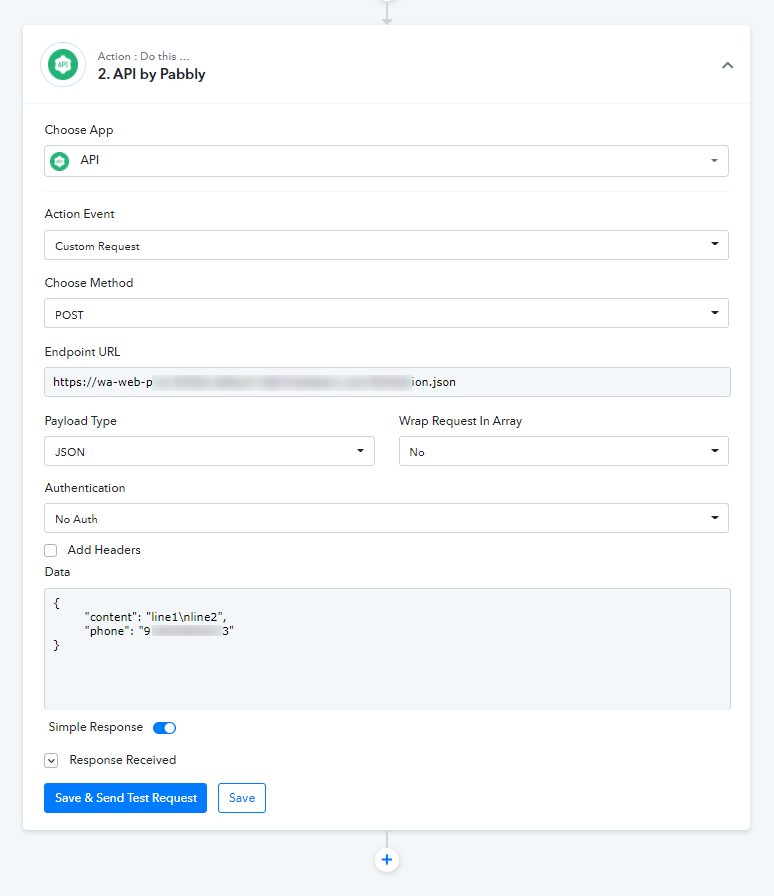
Since, the WA Web Plus API supports JSON as a payload, you need to make use of API module with Custom Request method and pass the JSON in Data field with proper parameters as provided by WA Web Plus.
Hi @Naveen
Thanks for the information, did you know if pabbly have any tutorial on this type of integration with custom request?
I never create a workflow like that before!
All the best!
Hi @NaveenThanks for the information, did you know if pabbly have any tutorial on this type of integration with custom request?
I never create a workflow like that before!
All the best!
Here is a video tutorial:
youtube.com/watch?v=M-oU-yG-CCU
Also, you can check your workflow: https://connect.pabbly.com/workflow/mapping/IjEyMjc0NiI_3D
Where we have used the Custom Request method in API Module there. See attached screenshot:
Hi @Naveen ,
Thanks for try to help!
I tested out the custom request method using the api.
For simple text messages it works fine, example:
{"phone": "MYNUMBER", "content": "Hi, this is a new message!", "type": "text"}
But if I follow the tutorial from Pabbly x WA Web Plus:

No messages are received.... and I'm converting to base64 a simple jpg with 303 kb
Thanks
Hi @Naveen ,Thanks for try to help!
I tested out the custom request method using the api.
For simple text messages it works fine, example:
{"phone": "MYNUMBER", "content": "Hi, this is a new message!", "type": "text"}
But if I follow the tutorial from Pabbly x WA Web Plus:
No messages are received.... and I'm converting to base64 a simple jpg with 303 kb
Thanks
I have just tried the same into your workflow and the API response is ok but couldn't get the content on my whatsApp.
I think, you should contact the WA Web Plus in this regard. May be there is some content length limitation there.
Also, you can check your workflow: https://connect.pabbly.com/workflow/mapping/IjEyMjc0NiI_3D