When razorpay payment is captured, the amount adds 2 zeros to the amount
Status: Closed · Asked by Ganga Narayan Das on · 0 views
I am saw this multiple times now.
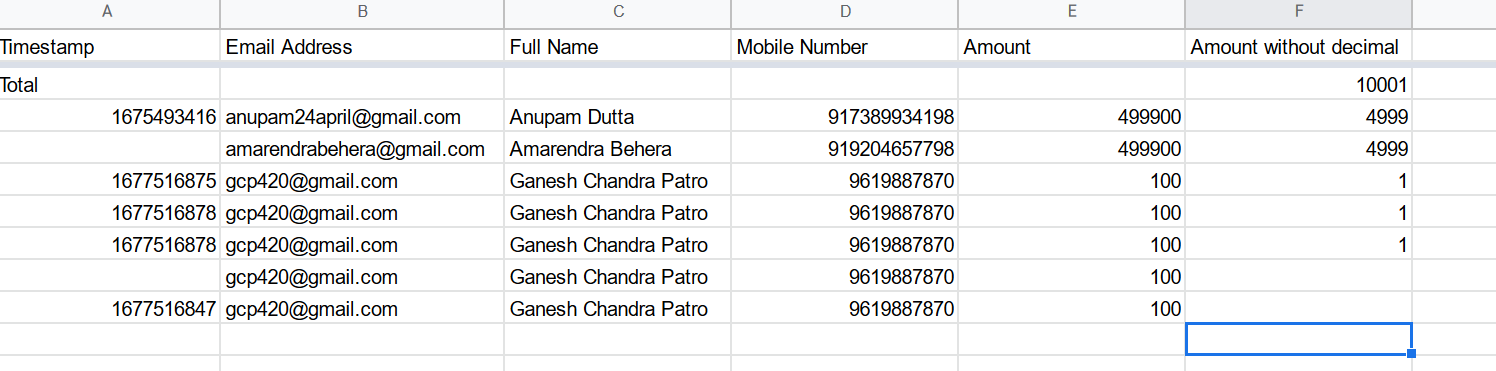
Whenever there is a payment capture, inevitably the amount column in my google sheet adds 2 zeros to the amount.
for 4999, it shown 499900
for 1 rupee it shown 100
How to avoid this?
As of now, I need to put a formula and divide it by 100 to get the exact amount.
But it is quite misleading.
Pl see how it can be fixed.
Even while the amount is selected in the workflow, it shows 100 in place of 1/-
Thanks and Regards
Ganga Narayan Das
You can use Number Formatter - Basic Math Operation - Divide to overcome this.(free task)
Make sure that you map the output of number formatter step in the gsheet step.
Also this something which can only be changed by Razorpay, not pabbly. And this also a standard practice in the payment gateway automations to receive data in hundreds. Stripe does the same as well.