Woocommerce detail about product quantity, product name and total
Status: Closed · Asked by Nekoret Lin on · 0 views
I would like to record all line items name and number from Woocommerce completed orders.
For example:
Order Number: #10000
Order Item:
1x Pen
2x Pencil
4x Paper
Pen is $1 for each
Pencil is $4 for each
Paper is $3 for each
and the Payment fee is $5
in the google sheet will be like
[TABLE]
[TR]
[TD]Order ID[/TD]
[TD]Order Detail[/TD]
[TD]Total[/TD]
[TD]Fee[/TD]
[/TR]
[TR]
[TD]#10000 [/TD]
[TD]1x Pen, 2x Pencil, 4x Paper[/TD]
[TD]21[/TD]
[TD]5[/TD]
[/TR]
[/TABLE]
I only can do "Line Items 0 Quantity"x "Line Items 0 Name", "Line Items 1 Quantity"x "Line Items 1 Name", "Line Items 2 Quantity"x "Line Items 2 Name"... etc
Is there a way for list up and record all line items and their quantity, name and total for Google sheet?
Hey @Nek0ret
You can try the Line Itemizer action step in your workflow for your concern to arrange the line items in comma separate values.
Hey @Nek0retYou can try the Line Itemizer action step in your workflow for your concern to arrange the line items in comma separate values.
Hello,
The different part is Woocommerce doesn't have the json data. This video might not answer my question.
Hello,The different part is Woocommerce doesn't have the json data. This video might not answer my question.
Which format you want Format 1 or Format 2
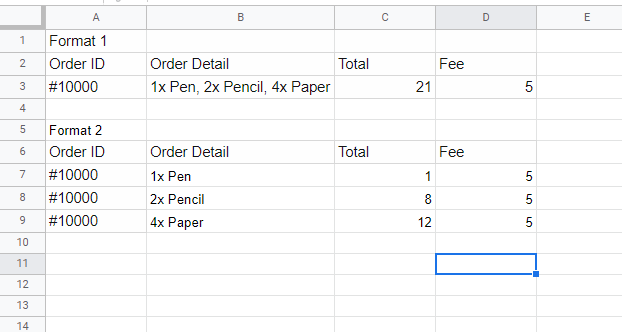
Which format you want? Format 1 or Format 2?
Format 1 Plz
Format 1 Plz
I think that is not possible without custom coding or pabbly team introducing functionality like Zapier's "Line-Item to Text".
But I would still tag @Supreme @Pabbly to confirm it.
Hey @Nek0ret
As of now the feature which you are looking for is not available on the platform but you can post the request to add the feature here -
I think that is not possible without custom coding or pabbly team introducing functionality like Zapier's "Line-Item to Text".But I would still tag @Supreme @Pabbly to confirm it.
Is there a way for format 3, which is something like this:
1, 2, 4, Pen, Pencil, Paper
Is there a way for format 3, which is something like this:
1, 2, 4, Pen, Pencil, Paper
Capture woocommerce data with simple response turned off.
Then use Data Transformer -> Line Itemizer with Line Items array from WC, which will comma separated values,
which you can later map in gsheet field side by side.
Capture woocommerce data with simple response turned off.Then use Data Transformer -> Line Itemizer with Line Items array from WC, which will comma separated values,
which you can later map in gsheet field side by side.
It doesn't have an all Line Items, do I need to array each line item name from Woocommerce?
Attachments
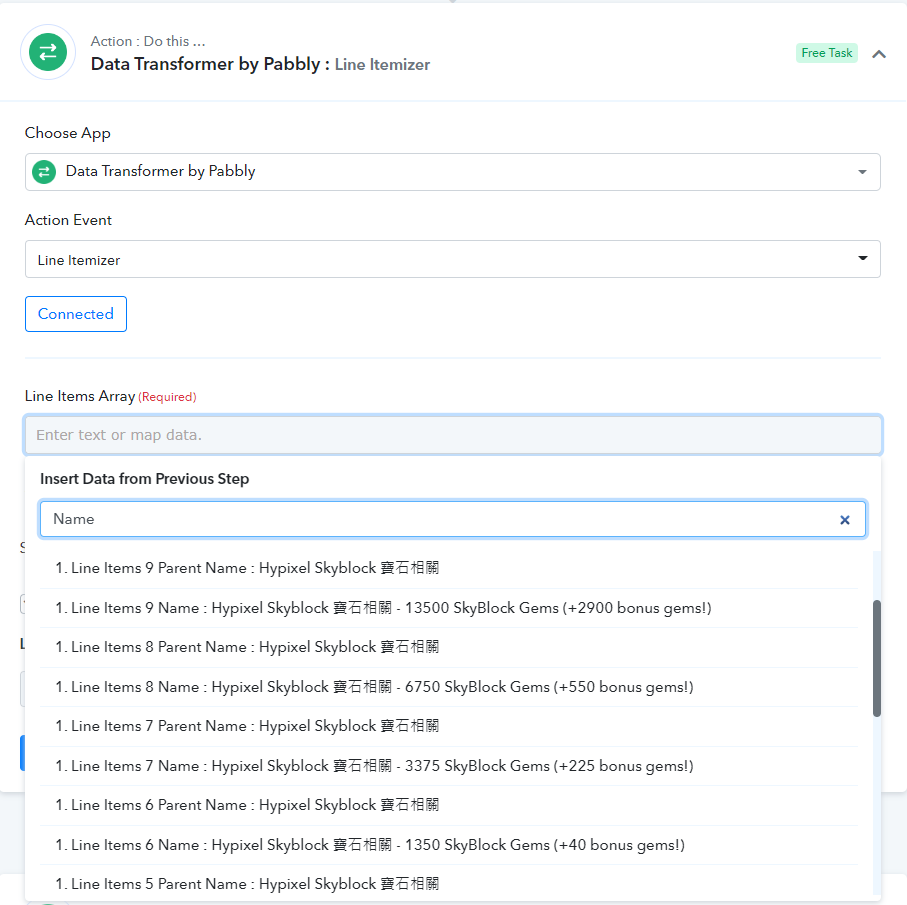
Which format you want? Format 1 or Format 2?
Sorry, one more question, how to do format 2