WooCommerce Order Completed
Status: Closed · Asked by KevinS on · 0 views
Hi.
It looks like there are only 2 triggers for a WooCommerce order
1. Order Created
2. Order Status changed.
I want to only send an SMS via Twilio when the order is created, this is working fine, and when the order is Completed, not every time the status is changed.
Hey @KevinS
I want to only send an SMS via Twilio when the order is created, this is working fine, and when the order is Completed, not every time the status is changed.
Kindly try the "WooCommerce: Order Updated" trigger event to capture when the status of the order gets updated. Let us know if that works for you.
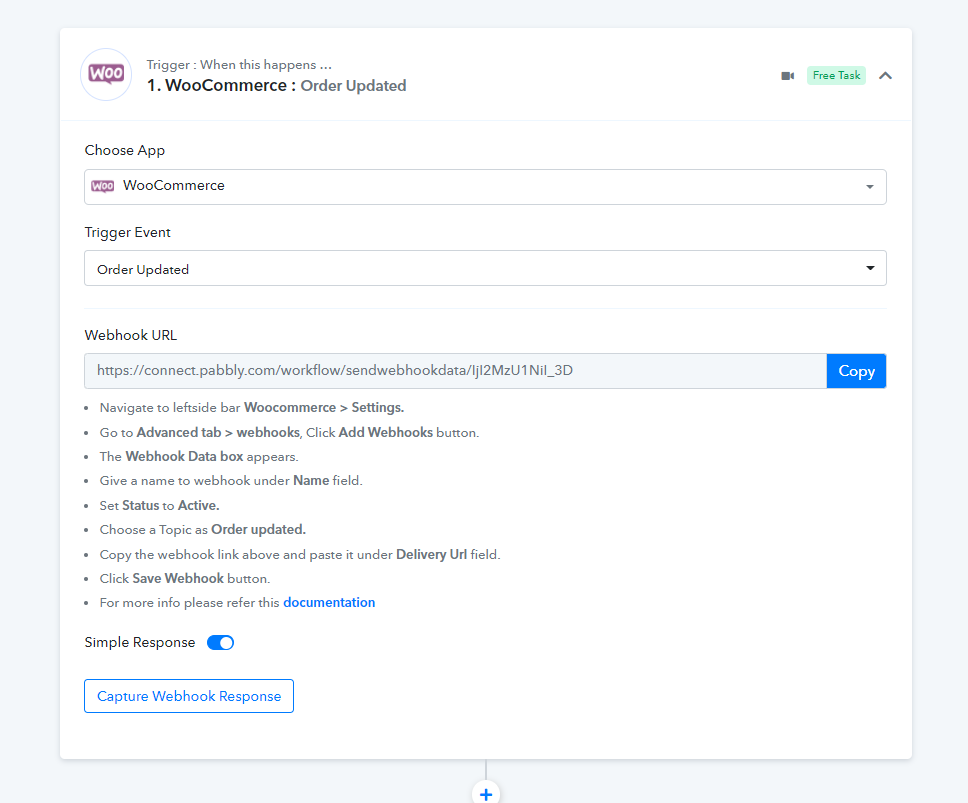
Thanks. I am using that but it is picking all the updates and i only want to send the SMS when the Tracking number is added.
Hey @KevinS
Pelase allows us some time to look into the possibility of your use case.
Thanks
I would be happy with a "Order Status changes to Complete" trigger
Hey @KevinS
I am using that but it is picking all the updates and i only want to send the SMS when the Tracking number is added.
We looked into the possibility of your use case and currently, it is not possible to lookup up the tracking number and triggers the orders.
I would be happy with a "Order Status changes to Complete" trigger
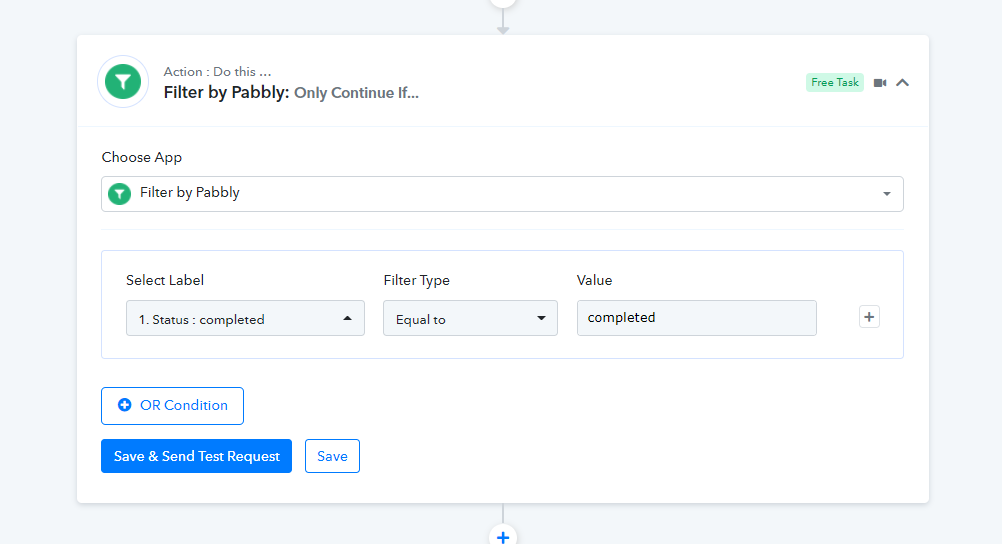
Further to processing the orders with "Complete" status only, you can add a filter action step after the trigger.
Kevin, I know this is from a month ago but I'll be using the mail parser feature to accomplish this. I have the emails sent to the mail parser email address to trigger the workflow.
Hey @StrangeValkyrie
Could you please tell us what is your use case and how you are using Email Parser in your automation? So that we can look into it and can assist you accordingly.
I use an Airtable spreadsheet to keep track of my sales so I created a workflow that updates the spreadsheet for me.
When an order status is changed to completed (or in my case "shipped" because I use the Advanced Shipment Tracking plugin) it sends an email to the customer and cc's the address provided by "Email Parser by Pabbly"
Then I use the text formatter to find the relevant info, the search Airtable action and the update record action. Works like a charm.
Hey @StrangeValkyrie
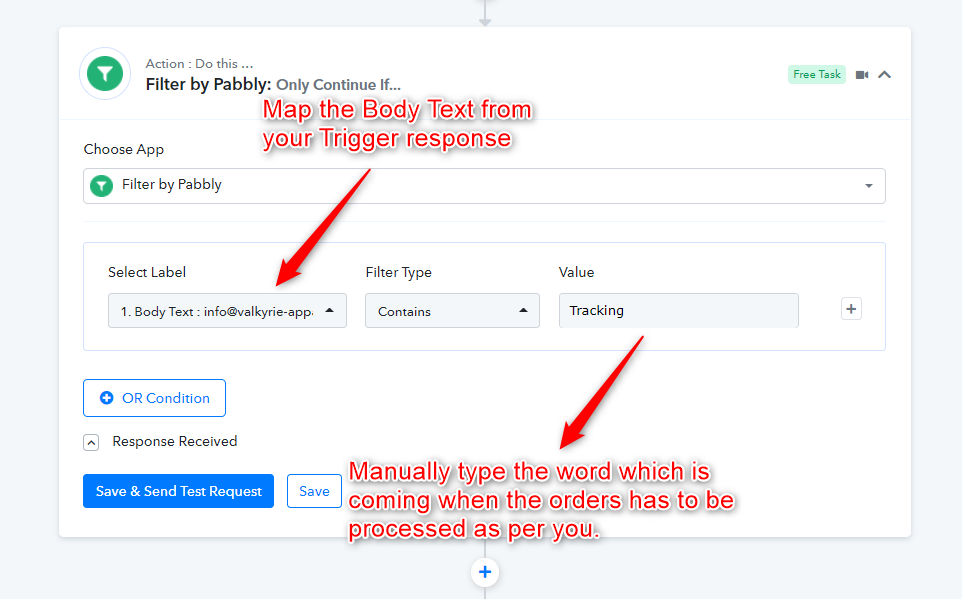
You can use the "Filter" action step in your workflow and can use Filter Type to "Contains" which will help you to process the orders which have Completed/Shipped/Tracking in it which you can type manually by yourself.
Kindly try this at your end and let us know if that works for you.
Will this method capture the tracking number added to my order from the API?
Hey @StrangeValkyrieYou can use the "Filter" action step in your workflow and can use Filter Type to "Contains" which will help you to process the orders which have Completed/Shipped/Tracking in it which you can type manually by yourself.
Kindly try this at your end and let us know if that works for you.
Hey @StrangeValkyrie
Do you want the Order number which is mentioned in your workflow as " Order #131971"?
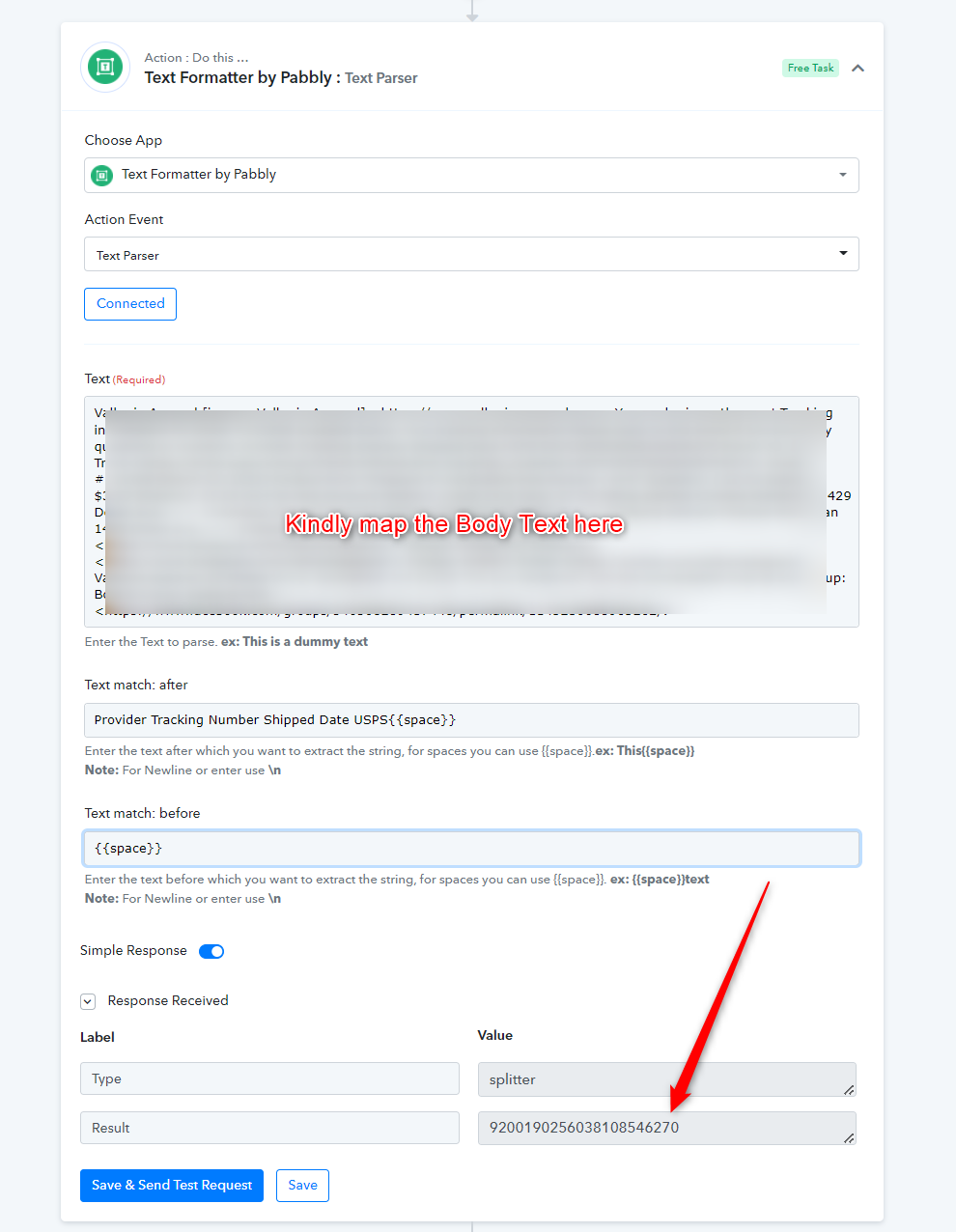
Or do you want the "Provider Tracking Number Shipped Date USPS 9200190256038108546270 March 29" mentioned in bold?
Else send us the screenshot of what you want to scrape from your Email body which is coming in your Workflow.
My question was regarding the second item "9200190256038108546270 "
Hey @StrangeValkyrie
Please check out the following screenshot and try this at your end to scrape the tracking number from the body text.
So both of your suggestion are pretty much what I was doing... I don't actually need help and was here offering a solution for the original poster.
Hey @StrangeValkyrie
So both of your suggestion are pretty much what I was doing... I don't actually need help and was here offering a solution for the original poster.
Since you are getting the order details via email and emails only have the data in the solid paragraphs. So this is the only way to retrieve the Tracking number. Furthermore, Text Formatter is free to use in your workflow which we wouldn't count as a task.