Woocommerce to Google Sheets
Status: Open · Asked by Technology Coaching on · 0 views
Hi, the Woocommerce order to spreadsheet workflow is showing an error, and i don't know how to resolve it. can anyone help me?
[TABLE]
[TR]
[TD][JUSTIFY]Hello Sooz Young,
This email is to notify you that for the workflow "Woocommerce order to spreadsheet" , a recent task was not executed due to following error - [/JUSTIFY]
Task History ID: IjU3NmQwNTY0MDYzNDA0MzY1MjY0NTUzZDUxMzY1MTYwNTQzNSI_3D_pc
Step Name: Google Sheets > Add New Row
Connection Name: Sooz@TC Google Account
Task Error Detail:
{
"error > code": 400,
"error > message": "Invalid JSON payload received. Unknown name \"\": Root element must be a message.",
"error > status": "INVALID_ARGUMENT",
"error > details > 0 > @type": "type.googleapis.com/google.rpc.BadRequest",
"error > details > 0 > fieldViolations > 0 > description": "Invalid JSON payload received. Unknown name \"\": Root element must be a message."
}
Note that the workflow has not been paused and continues to run according to your settings. Further, you have the option to re-execute tasks that encountered error from the history section.[/TD]
[/TR]
[/TABLE]
Hi @Technology Coaching,
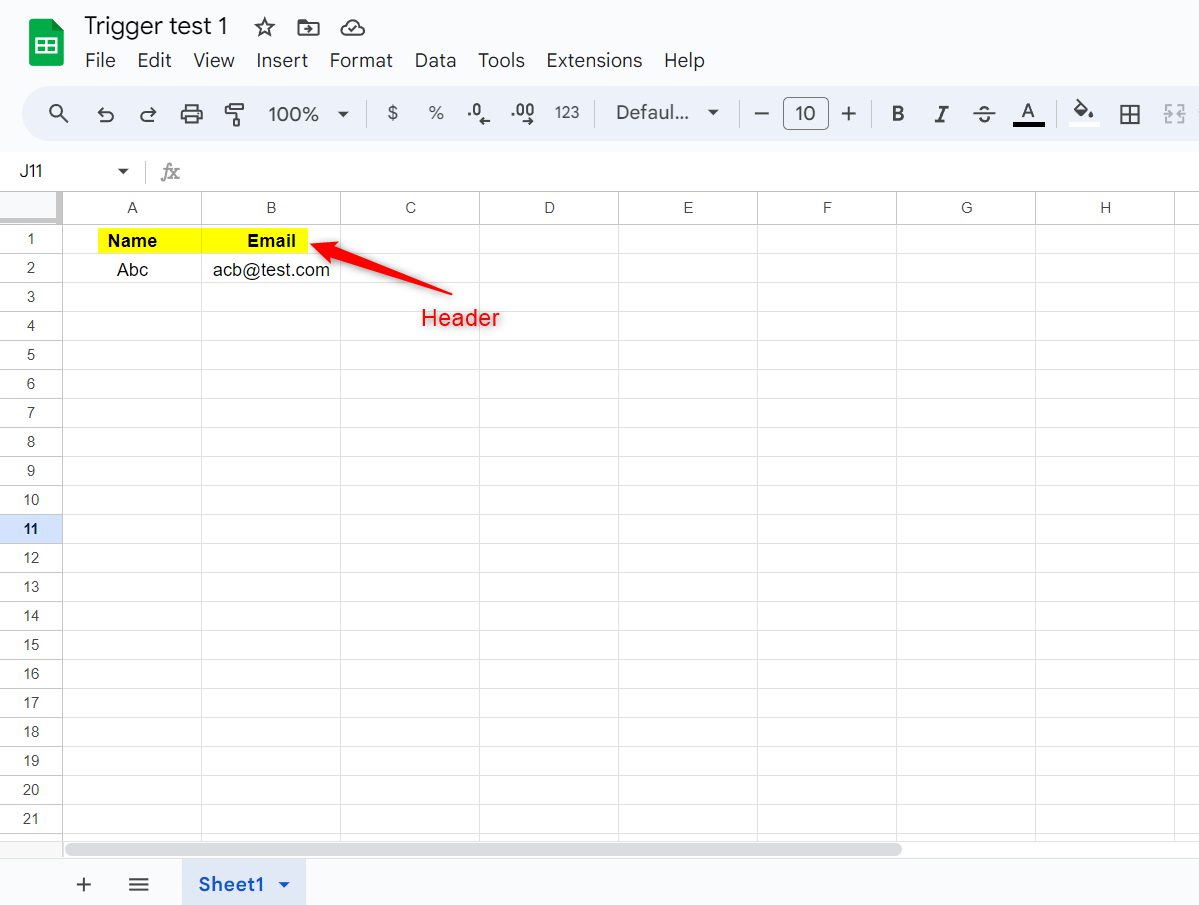
Please make sure the Google Sheets spreadsheet you are trying to connect with has Headers.