Workflow is actioning an old file
Status: Closed · Asked by Dave Roberts on · 0 views
Hello. We have a new workflow that I cloned and amended to cater for the new input files. It worked a few times, but is now continually actioning a previous file that was submitted, rather than the current file.
Have I missed a step?
Task History ID -
IjU3NmMwNTZlMDYzNjA0Mzc1MjZhNTUzNDUxM2E1MTYxNTQzOCI_3D_pc
Executed at
Apr 26, 2024 16:18:34, (UTC+12:00) Pacific/Auckland
https://connect.pabbly.com/workflow/share/C0NWZFYBAWJfFVU_BVZUcw0ZUVUCW1Q1XEVWRAQLAHgGSAlyVxZfNQlFBCYEZQdmVh8JYwdbDDZaTgMHCV8GdVJIVHgDAF0nUx5WLQxvWmkLVVZ-Vjc#
Hey @atatu.co.nz
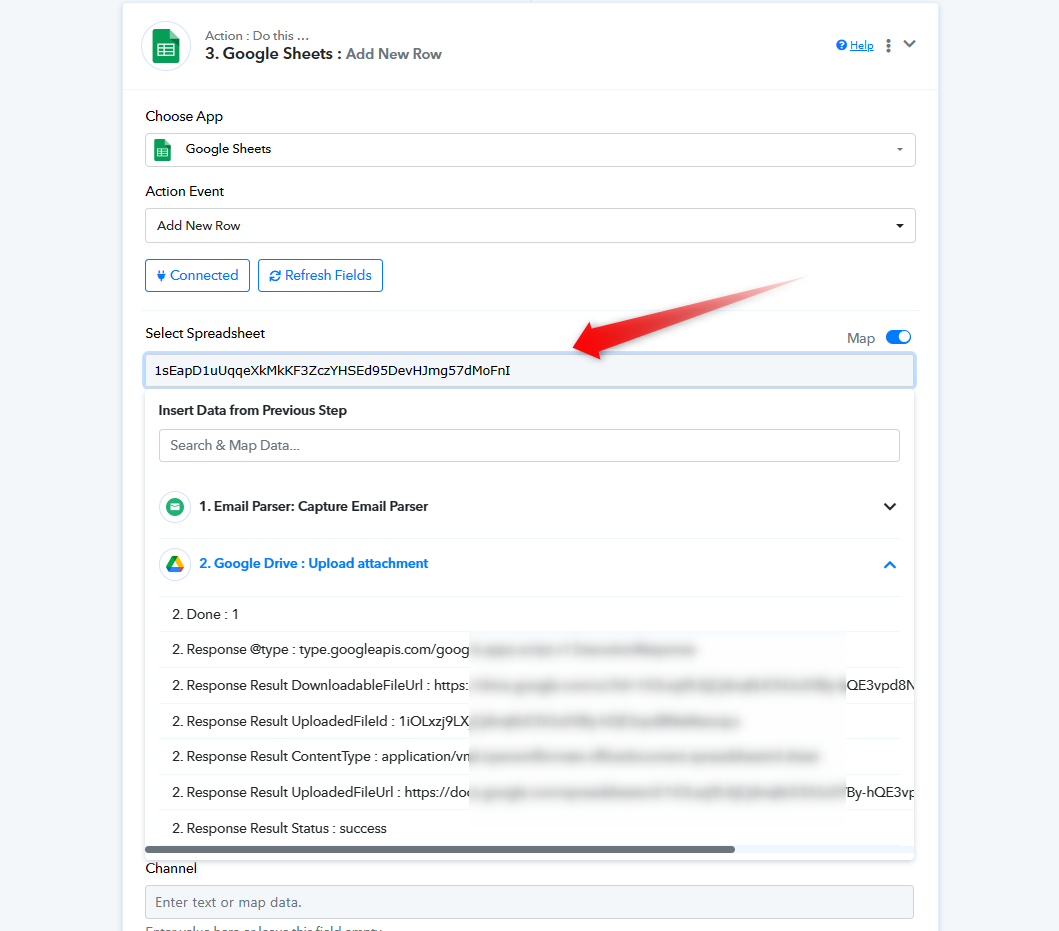
We don't have a full understanding of your use case, but based on what we know, it seems like you've statically passed the file ID and URL in the Google Sheets and Google Drive action steps.
We suggest reviewing your workflow and dynamically mapping the fields based on your specific use case.
E.g. -
No, the spreadsheet itself is working fine. I think that the problem lies in the creation of the output files. They need to be updated. Thanks for your help.
I think that the problem lies in the creation of the output files.
You might want to consider reconfiguring the links in Google Drive and making the IDs dynamic as well.