Workflow Not Starting on Schedule
Status: Closed · Asked by realestatebroker on · 0 views
Workflow Not Starting on Schedule
Hey @realestatebroker
Please allow us some time to check your concern. I will get back to you soon.
any update?
its been 18 hours any update???
I fixed it by coping the workflow and trigger with sheets... However it gave me 2000+ tasks done and it is not possible please check - https://connect.pabbly.com/workflow/share/XRVWZAdQUDNTGQljVAcAJw8bV1NUDQRmU0pTQVVaVCwESlI5URAPZQ9DVnQCUQNiXxYIYgRYBD4PG1VRUgRUJ1dNABJcX1wmUx4Efw1EATJdA1Z-B2Y#
Hey @realestatebroker
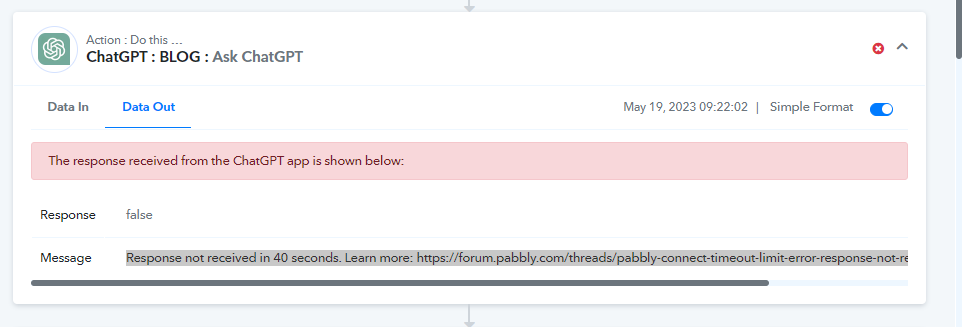
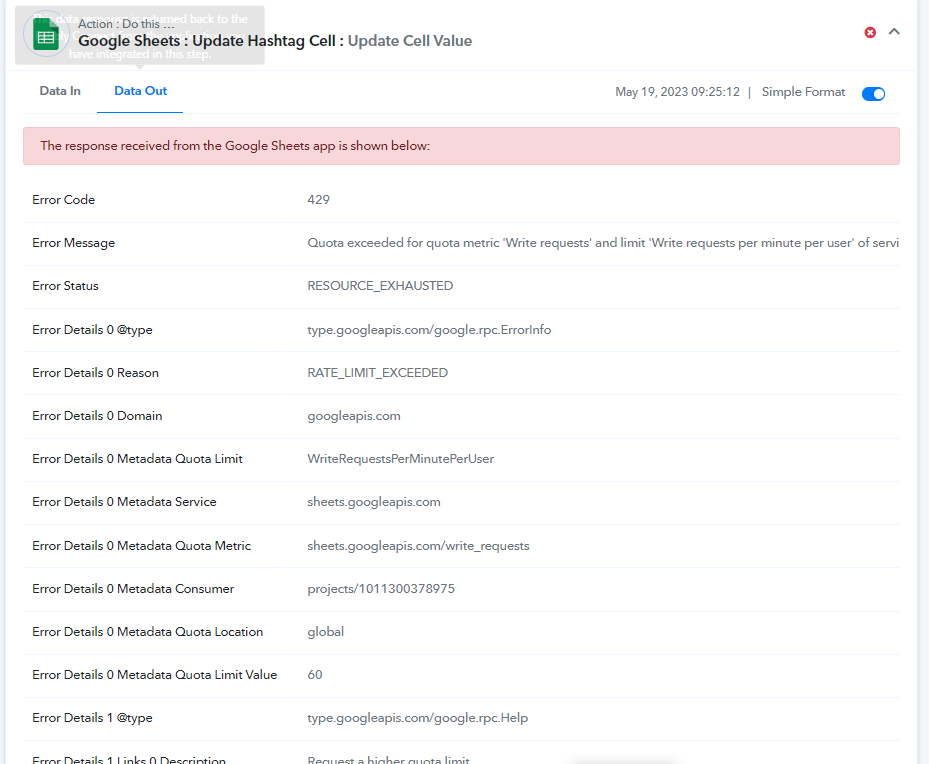
As I can check from your workflow, I have observed that you are facing errors in two action steps: "Google Sheets: Update Cell Value" and "ChatGPT: Ask ChatGPT".
The error you are receiving from the "Google Sheets: Update Cell Value step" indicates "RESOURCE_EXHAUSTED" and "RATE_LIMIT_EXCEEDED." which means that Google Sheets has specific threshold limits for each Google account, which may have been exceeded during the execution of your workflows. To resolve this, I suggest you to wait for some time and then try to capture the response again.
The second error is from the "ChatGPT: Ask ChatGPT step". This error occurs when Pabbly Connect waits for 40 seconds to receive a response from OpenAI. If the response does not arrive within that time window, the error is triggered. We have already reached out to OpenAI and requested optimization of their API responses, but we have not yet received a response from them.