Workflow Problem
Status: Closed · Asked by Abhijeet Pillay on · 0 views
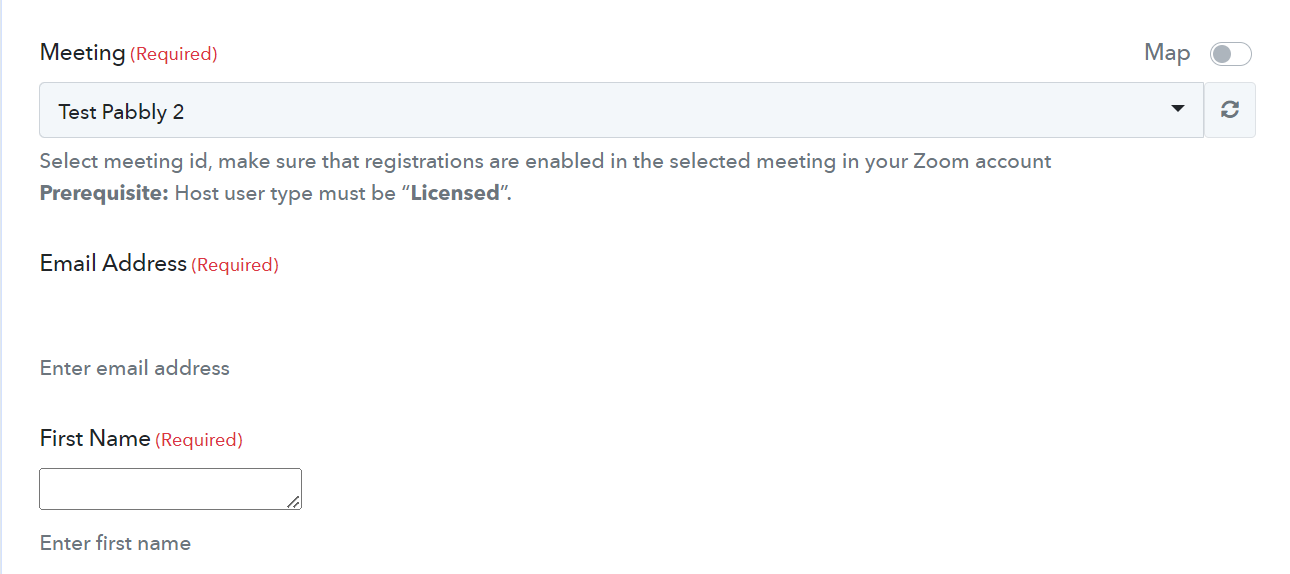
I was running a test on my free account. I created a test meeting in our zoom app. Here While selecting the meeting as "Test Pabbly 2", the Email address column is not visible and it automatically disappears. Please Help!
Hey @Abhijeet Pillay
I request you to clear the cache and cookies from the browsers and then try to reconnect with the zoom application. This process involves deleting any stored data in your browser that may be causing conflicts or errors with the application.
Please let me know if the issue still persists.
How to Connect Zoho Forms to Webinarjam.
When a lead is filled in Zoho forms we want that lead to get triggered in Webinar jam
Looking forward for your help.
Hey @Abhijeet Pillay
At the moment, we do not have a video tutorial specifically for connecting Zoho Forms to Webinarjam. However, you can refer to the following videos, which may be helpful in this regard.
(Watch the first part of the video)
youtube.com/watch?v=82UctQx2gEs
(Watch the second part of the video)
youtube.com/watch?v=eJyYL4imXQ4
Do let us know if you get stuck in any step, so we can check it for you.