Workflow: QR.io to Google Slides
Status: Closed · Asked by zest83 on · 0 views
Is there a video showing how to Generate a QR code (Using QR.io) via. Information Received from Google Sheet (Trigger) .. and finally putting the QR code on a Certificate (Generated using Google Slides)
Hey @zest83
Is there a video showing how to Generate a QR code (Using QR.io) via. Information Received from Google Sheet (Trigger) .. and finally putting the QR code on a Certificate (Generated using Google Slides)
You can refer to the following video tutorial on your concern to create QR codes in live automation.
Thanks for sharing the video
BUT this video is not solving my challenge
This video is sending a QR Code as a "LINK" in the message AND Not as an IMAGE
How do we send the image of the QR Code Generated to someone?
Hey @zest83
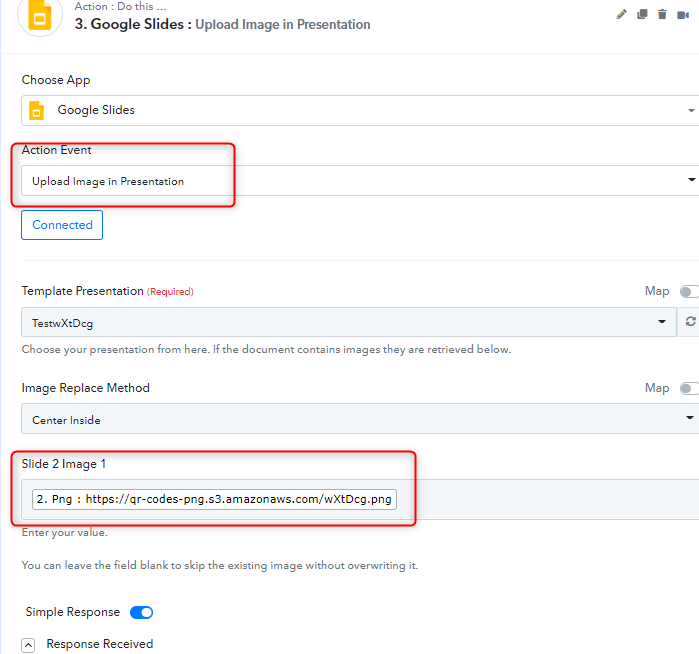
You can map the link as an image in the Google slide. For that, you need to include Google Slide and added a temporary image to it. Then you can map it like as shown in the below screenshot:-
Thanks
Kunal
Can you show me a small preview of how the IMAGE is Mapped.
I know how to MAP the Text...
Hey @zest83
Once you get the image from QR.io then you can add the image inside the Google Slide as shown in the below screenshot:-
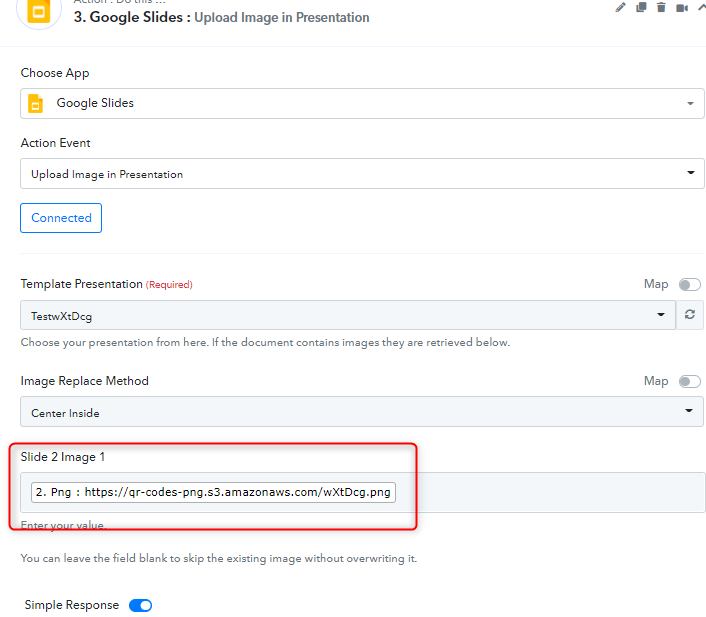
You can also check the below video to check how to add the image to the Google slide.
youtube.com/watch?v=-NXmZ2jRdE0:14
Thanks
Kunal
Attachments