Workflow test work but it is not working automaticly
Status: Closed · Asked by Carles on · 0 views
Hi,
I just created a workflow based on this tutorial (send coupon codes after filling a form):
youtube.com/watch?v=xnCu1sJWhLQ
When I save & send a test request, it does the job perfectly.
But then, If I'm trying to work outside Pabbly filling the form, it doesn't send the email with the coupon code.
Could you help me with this, please?
Thanks
When I save & send a test request, it does the job perfectly.
But then, If I'm trying to work outside Pabbly filling the form, it doesn't send the email with the coupon code.
Could you help me with this, please?
Could you please recapture the webhook response once and then try again?
Further, please check whether you have opted for the "Send On Event" or not in the Pabbly Connects ad on.
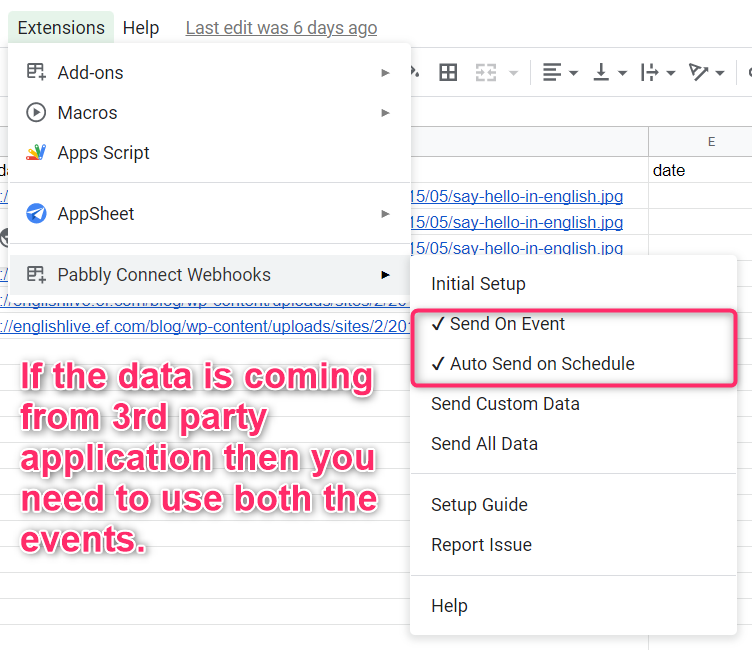
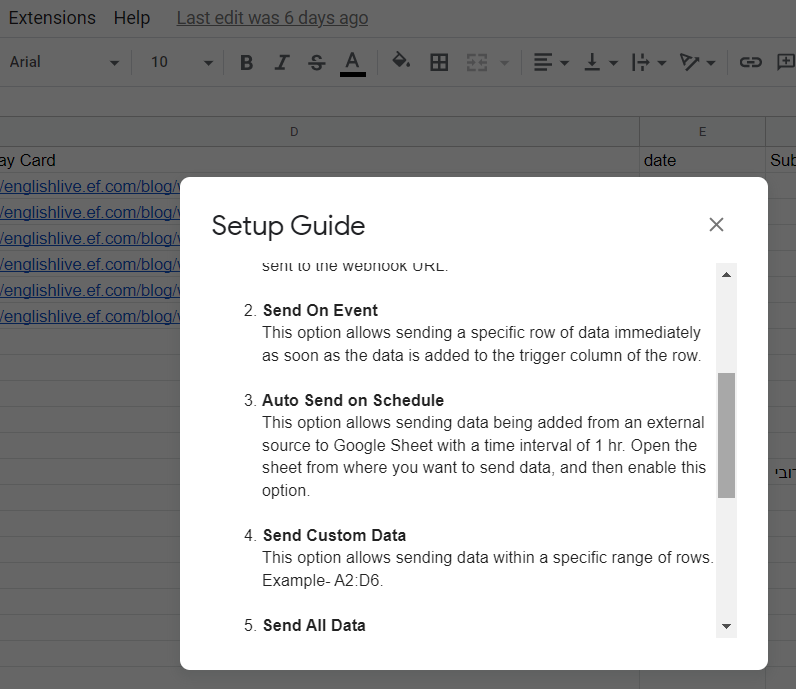
Hi, I had not switched on the "Send On Event" and "Auto Send on Schedule". I just did it, re-captured the webhook but it is still not working...
Hey @Carles
Kindly only pick "Send On Event" and try again. Make sure you are passing the data to the triggering column.
Hi, finally it worked. But it takes a lot of time to receive the email after submiting the form. Is it normal?
Thanks
Hi, finally it worked. But it takes a lot of time to receive the email after submiting the form. Is it normal?
Thanks
If you are getting data in your Google Sheets through any 3rd party app. Therefore, in Pabbly it will take 1 hour to pass the data from Google Sheets to other app. Auto Send on Schedule will make sure that data will flow from your Google Sheets to other app after every 1 hour.