YouTube Video Upload not going passed 3:50 for longer videos
Status: Open · Asked by Real Estate Integrate Inc. St. Hilaire on · 0 views
I have tried multiple times to get a video to post on YouTube that is 297 seconds or 4:57 and it only uploads a video that is 3:50 long, clipping off the last third of the video. Why is this happening and how do I solve this?
I used the YouTube Uploader many times and it's worked fine for my videos. Now I'm building a better system and all of a sudden it stops working correctly. My total video size is only 61.4 MB and I am also including a step after a 15 minute delay for the "Get Video Upload Status" which if there was more to upload, your instructions say this would make it continue and complete. This doesn't seem to be the case. The workflow is in my folder called "Users" and the name is "New Listing Added to Databases". It's a large wokflow, but the YouTube video step is within the router step at the end, then router step again, then choose the YouTube step if you need to find where it's located.
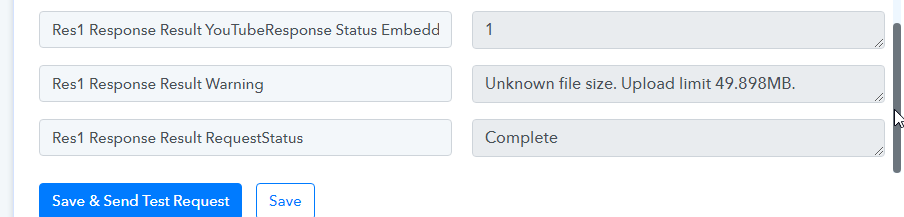
I just did a test outside of my workflow and it's happening the same on a different YouTube account of mine as well. Is this related to this earlier issue regarding unknown file sizes which I thought was resolve back in Novemberhttps://forum.pabbly.com/threads/youtube-create-video-doesnt-work.9766/#post-46091
Hey @andrewstrealtor
Would you mind sharing the procedure and video URL you're attempting to pass? Along with the name of the workflow.
This is the video URL: https://cdn.creatomate.com/renders/b82ebfaa-583e-4794-bde4-c318c359ed12.mp4
I tried setting up a test workflow with only 3 steps and the same issue resulted. 1) upload youtube video, 2) delay 15 minutes, 3) use the get media to get the final info and also push any remaining data to complete as per your instructions. it does not work.
So am I waiting another 24 hours for a response now?
Hey @andrewstrealtor
We try to deliver the assistance at the earliest as we get a complete response from the users.
Would you mind sharing the procedure and video URL you're attempting to pass? Along with the name of the workflow.
Always send the Content-Length with the file URL. If not, the YouTube action will limit the size of files you can upload to 50 MB, and you will see a warning message "unidentified file size Upload maximum of 49.898 MB "in the reaction.
https://forum.pabbly.com/threads/how-to-upload-videos-on-youtube.9711/
We’ve been over this before. I even included a link to the old conversation. The content length IS being sent with the URL. Why do you keep saying it isn’t?
Look at the header info right here. I can’t keep losing time waiting for a reply with no fix if you aren’t even checking things. Did you test the URL I shared to check if the content-length info was present or not? It is clearly present.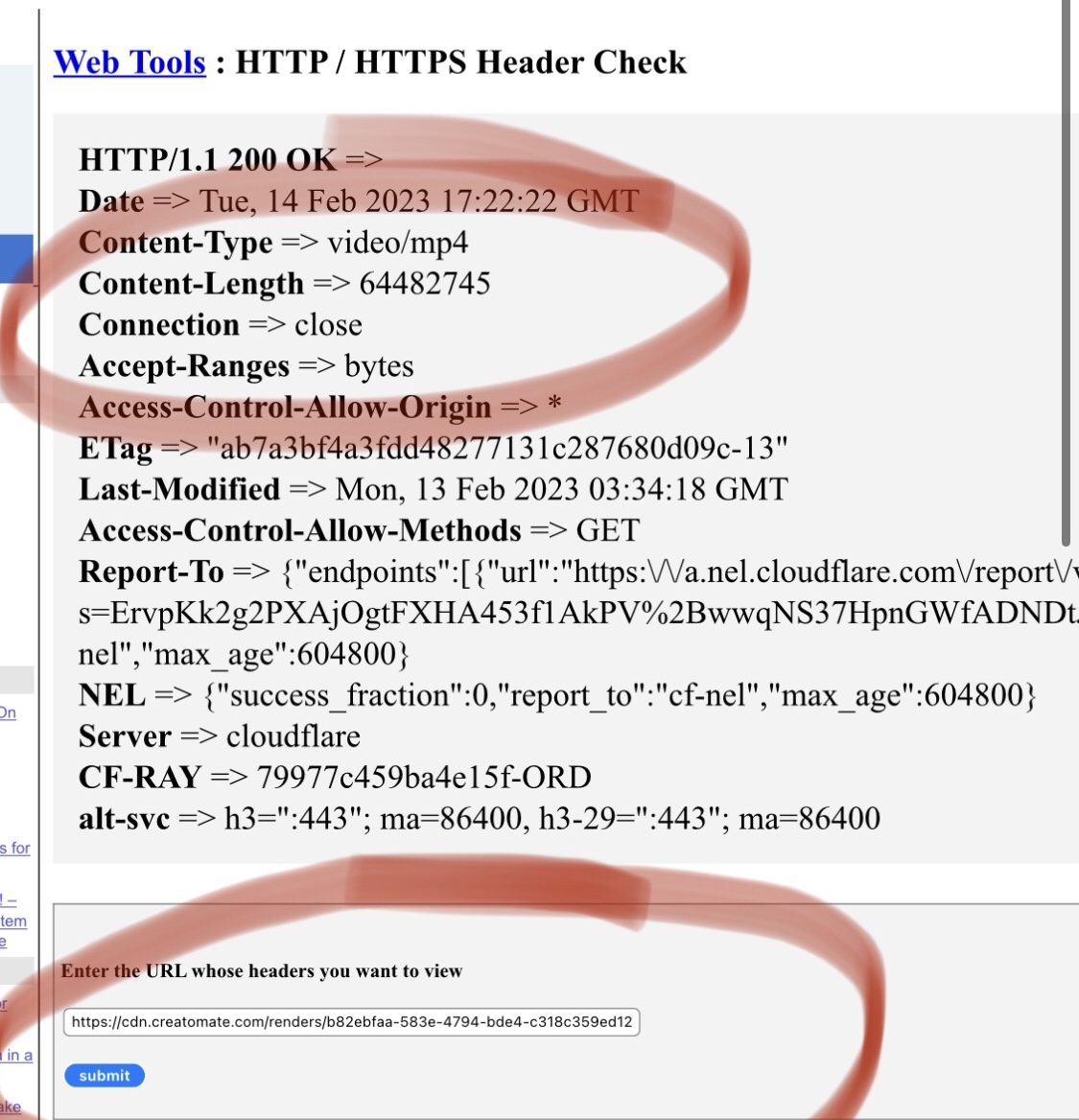
I don’t have it in a workflow because it isn’t working. I told you I built an individual test workflow with 3 steps. 1) upload YouTube video 2) delay 15 minutes 3) get video details
It did not work.
I just made a test workflow again. Same problem. Video URL headers definitely include Content-Length as shown above. Please fix this. It's only 64 MB not even close to 400MB.
Workflow name: "Upload To YouTube Not Working"
Earlier we observed that URLs returning "Content-Length" also respond to request's "Content-Range" header. This is why, for simplification, we told that "Content-Length" is required.
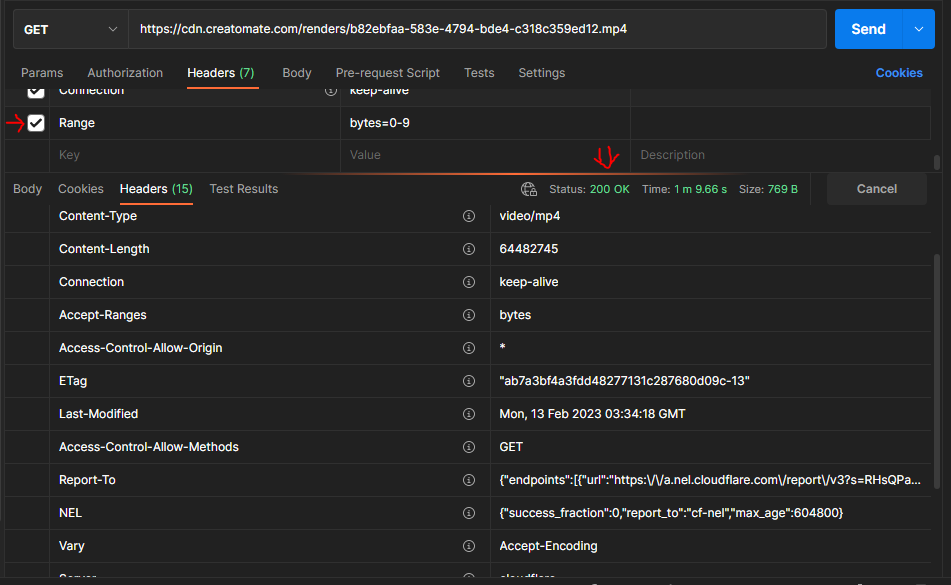
But, now we are noticing that a URL may not respond to request's "Content-Range" header even if it returns "Content-Length". This is what happening with cdn.creatomate.com domain. There is no workaround to make this kind of URLs compatible with part-by-part download.
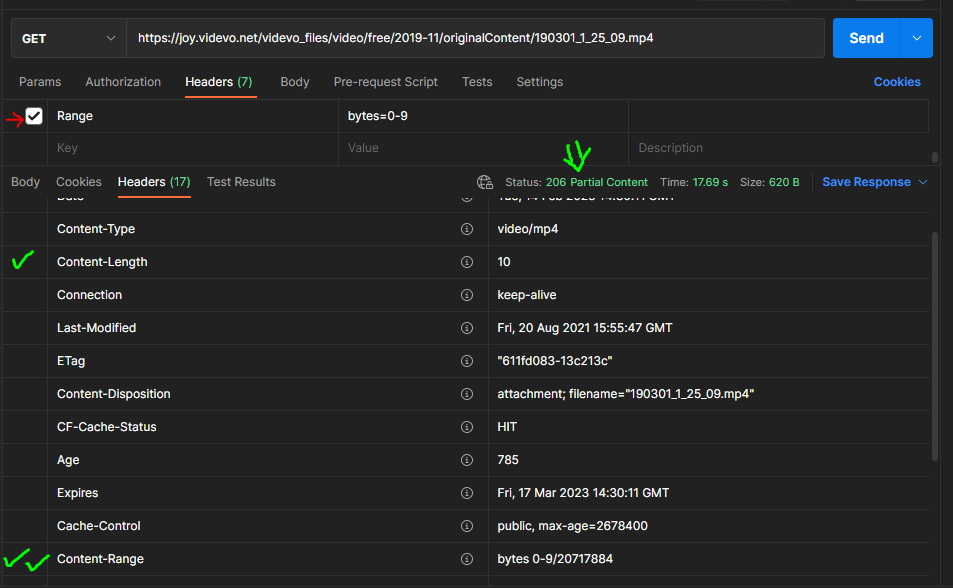
This is a sample video URL that will work for part by part download because it includes both the headers. Content-Length and Content-Range.
This will not work for part by part download because it does not have Content-Range header apart from Content-Length.
For large video uploads, Content-Range headers are also required in the headers of the file.
If Content-Range header is available when we make a GET request with "Range" header, our API will be able to upload large files.