Zoho CRM lead and Whatsapp not working
Status: Closed · Asked by viclav5 on · 0 views
Hello there I've been trying to make an automation with Pabbly as follows:
Zoho CRM lead creation to welcome WhatsApp message. It works for the few first leads and then stop working. Can anyone please provide support my accounts is under email: [email hidden] , the workflow name is : NEW ZOHO CRM LEAD TO WHATSAPP 1
Thank you
Victor
Hey @viclav5 !
On checking upon your workflow, we can see that + is also getting pass with the Phone number inside the WhatsApp Cloud API, which is why it's not sending the text for you-

Kindly refer to this thread, through which you can extract the numbers and then map the response to the Cloud API step and then click on just "SAVE"- https://forum.pabbly.com/threads/how-to-extract-phone-number-from-the-user-submitted-numbers.38/
Once done, kindly do a test submission to check on it if its working for you now.
Hey @viclav5 !On checking upon your workflow, we can see that + is also getting pass with the Phone number inside the WhatsApp Cloud API, which is why it's not sending the text for you-
Kindly refer to this thread, through which you can extract the numbers and then map the response to the Cloud API step and then click on just "SAVE"- https://forum.pabbly.com/threads/how-to-extract-phone-number-from-the-user-submitted-numbers.38/
Once done, kindly do a test submission to check on it if its working for you now..
Hello,
I followed the instructions and made it work. However, It worked for few instances and then stopped working. What happened?
Hey @viclav5
Kindly try recapturing the webhook response once and then try again.
I hope this might help you out.
I did it but still does not work! please your help
Hey @viclav5
Kindly try again by making a new connection and then capture the webhook response from Zoho CRM.
Hi There,
I did create a new conection for every single part of the automation including Zoho crm. it works for the first two test instances but then stops working for real clients. I request your serious help with this issue since it's affecting my business. I look forward to hearing from you soon
Hey @viclav5
We are currently looking into your concern regarding the trigger event.
But meanwhile, you can use the Webhook by Pabbly trigger event to receive the new Leads from your CRM.
https://www.zoho.com/developer/help/extensions/automation/webhooks.html
Hi, I am also facing this issue, where few leads are captured and than it stops working capturing leads and workflow no longer functions. Team please check, this is sort of urgent
Hey @medialabs18
We have contacted their support team for the same since the API token was getting revoked after 24 hours.
We will notify you with an update soon.
What I can see in this particular thread, this issue was reported in August, its October now. How much time may it take as we have Zoho CRM and without this the one of our workflows will not work
What I can see in this particular thread, this issue was reported in August, its October now. How much time may it take as we have Zoho CRM and without this the one of our workflows will not work
On checking the concern with the tech team, Zoho CRM provides with one-day connection only-
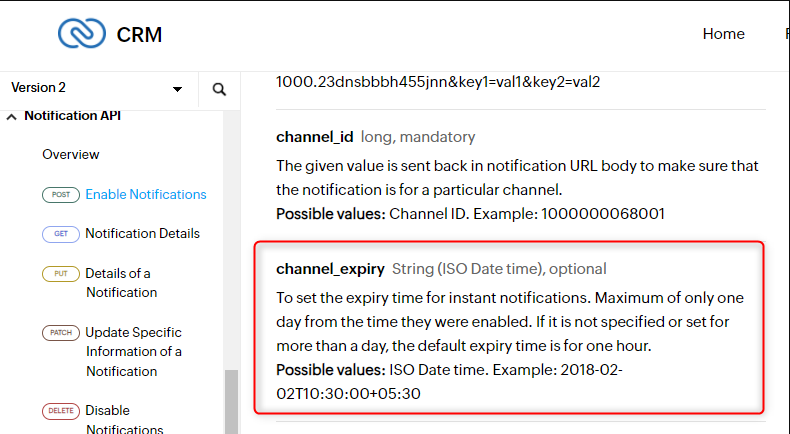
So the next day you would be required to re-connect the step for the trigger in order to make it work for you.
Can Pabbly not introduce something like this done by Interakt..... where we can add it as an action which executes when a workflow is executed https://www.interakt.shop/resource-center/whatsapp-api-integration-with-zoho-crm
Hey @medialabs18
We cannot manipulate the API settings in Zoho CRM's integration. You should contact their support team for the same.
This is not manipulation. This is adding actions with proper settings.
This is not manipulation. This is adding actions with proper settings.
We cannot interfere with the integration with irrespective of Zoho CRM's API documentation.
You can perhaps contact their support team on your concern, if they make such changes in their API documentation we will also upgrade the trigger and action step accordingly.