Zoho Sheet Delete Row
Status: Closed · Asked by Thomas Cochran on · 0 views
When you "delete row" in Zoho Sheets, it just leaves a blank row. It does not truly delete the row, which doesn't allow for a full Sheet Search in the future. A gap row is left when you use "delete row". Hope this can be fixed ASAP!
Hey @tboy123
We looked into the Zoho Books API reference its action step doesn't add any option to shift up the cell after deletion.
https://www.zoho.com/sheet/help/api/v2/#UPDATEWORKBOOK-Delete-rows
Though we have forwarded your concern to our tech team if it is possible to shift the cell after deletion.
Hey @tboy123
We have added the Zoho Sheets : Delete Rows action step which will delete the row from mid and remove the sapce aswell.
KIndly give it a try and let us know if that works for you.
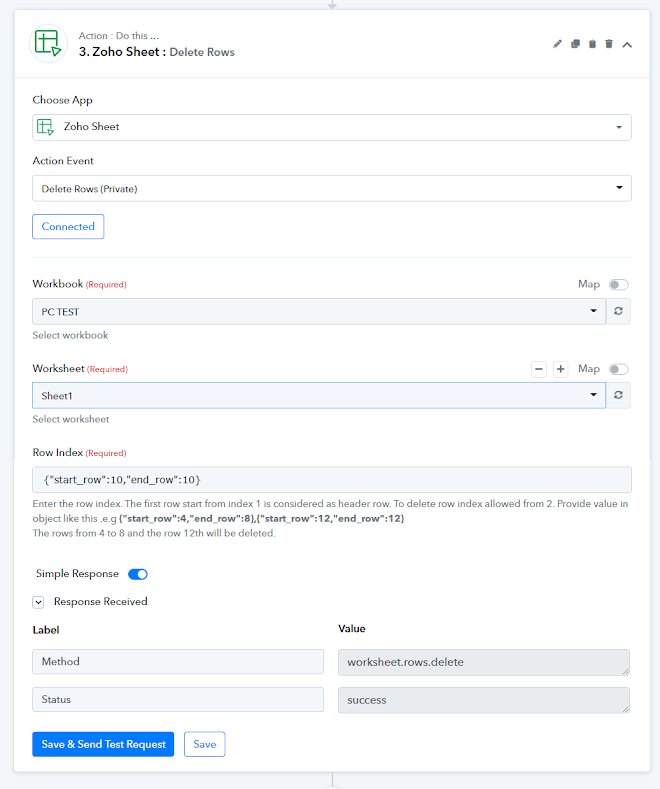
Worked like a charm! Thanks! That will save me a lot of headache!
You should change the title of "Delete Row" to "Clear Row Data" to avoid confusion for people. "Delete Rows" is a fitting title for that function.
Thanks again!
Thanks for the suggestion, we will update the name of the action step accordingly.