Zoom Connect worked but now is not working anymore
Status: Closed · Asked by Rene Rink on · 0 views
Hi,
I use zoom Triggers with pabbly connect.
They worked for 2 webinars fine.
Now I want to start a new webinar.
use the same connection app.
But I get no trigger and no new data.
Also the other webinar (recurring one) stopped to get data
Can you help?
I updated the zoom connection and valdiated the events...
thx
Hey @ReneRink
Based on our analysis of your workflow, it appears that the webhook URL in the Zoom application has not been configured correctly. This misconfiguration is leading to a lack of response.
To resolve this, we recommend creating a new workflow and attempting the setup again. It's worth noting that your other workflows have demonstrated successful functionality according to their history.
Your other workflow-
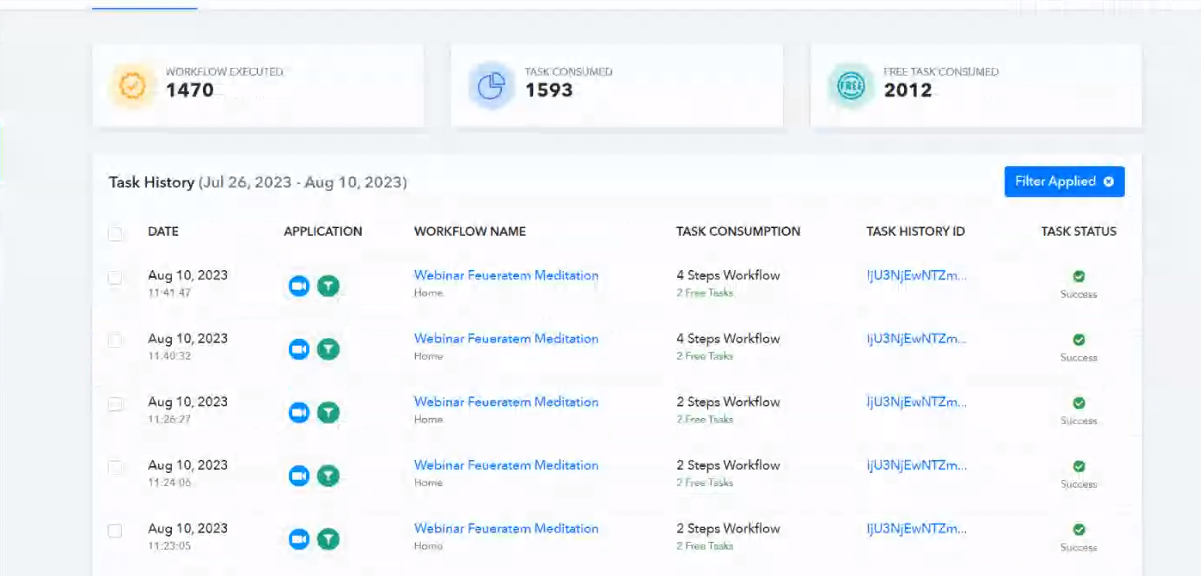
Additionally, please be aware that modifying the existing connection could potentially impact the performance of your other workflows.
ok, so do I need to built an EXTRA Zoom App for each workflow / webinar?
or can I use the same Zoom App with different workflows, and than work with filters?
ok, so do I need to built an EXTRA Zoom App for each workflow / webinar?
Yes, that would require you to create an individual app for different workflows and Zoom trigger events.
or can I use the same Zoom App with different workflows, and than work with filters?
If you selected multiple trigger events for the same app then you can use the Router action step to process the different events individually.