• Instructions to Ask a Question

    For any assistance, please click the "Ask a Question" button and select the Pabbly product for which you require support.

    We offer seven comprehensive applications designed to help you efficiently manage and grow your business:

    Our support team endeavors to respond within 24 business hours (Monday to Friday, 10:00 AM to 6:00 PM IST). We appreciate your understanding and patience.

  • Due to Holi celebrations, our team will have limited availability. While we’ll continue to monitor threads, responses may be slightly delayed. Normal operations will resume on Thursday, 5th March 2026.

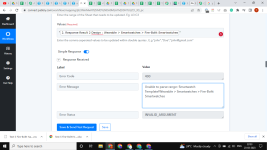
400 error code for (Wearable > Smartwatches > Fire-Boltt Smartwatches)

i want to receive this text (Wearable > Smartwatches > Fire-Boltt Smartwatches) but pabbly shows 400 error code (Unable to parse range)

how to get this value without an error in google sheet
 

Attachments

  • 1679591000035.png
    1679591000035.png
    87.2 KB · Views: 160

Pabbly

Administrator
Staff member
i want to receive this text (Wearable > Smartwatches > Fire-Boltt Smartwatches) but pabbly shows 400 error code (Unable to parse range)

how to get this value without an error in google sheet
Please share the workflow name so that we can review the workflow setup you have done.
 
P

Pabblymember11

Guest
It appears that you have passed the products name in the Range field whreas you need to pass the Google Sheets range.

Please cehck the helptext carefully and try again.


1679642786189.png
 
Top