• Instructions to Ask a Question

    For any assistance, please click the "Ask a Question" button and select the Pabbly product for which you require support.

    We offer seven comprehensive applications designed to help you efficiently manage and grow your business:

    Our support team endeavors to respond within 24 business hours (Monday to Friday, 10:00 AM to 6:00 PM IST). We appreciate your understanding and patience.

    🖤 BLACK FRIDAY DEALS ARE NOW LIVE! 🖤

    🔥 Enjoy an exclusive 10% discount on our LTD Plan — first-time ever offer!

    🚀 Unlock the Pabbly Plus Unlimited Yearly Plan and get unlimited access to every Pabbly application at a truly unbeatable Black Friday price.

    👉 Grab the Black Friday Offer

Pabbly delay doesn't work

gpro

Member
Your Workflow URL
https://connect.pabbly.com/workflow/mapping/IjU3NjcwNTZkMDYzNjA0MzM1MjZkNTUzMDUxMzIi_pc
Your Task History ID
IjU3NjUwNTZhMDYzZTA0MzE1MjY4NTUzYzUxMzQ1MTYxNTQzNDBmMzci_pc
Consent to Access & Modify
I authorize Pabbly Support to log in to my account and make changes to the specified workflow for troubleshooting.
I setup Delay for 1 Minutes but the autoflow was no delay, keep auto run per second.
Please advise!


1764389720552.png
 

Preeti Paryani

Well-known member
Staff member
Hello @gpro,

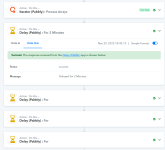
The delay seems to be working fine, refer to the attached images.

1764395704039.png


1764395710726.png


If it is still persisting, could you please share a screencast instead, you can better understand exactly where it didn't worked.
 

Preeti Paryani

Well-known member
Staff member
Hello @gpro,

Could you please try adding a two-minute delay just after the iterator, instead of adding a minute delay at the end? Let us know if it works fine then.
 

ArshilAhmad

Well-known member
Staff member
I tried another position for "Delay 2 minutes", you can find the screenshot shows the time didn't delay.

Workflow: https://connect.pabbly.com/workflow/mapping/IjU3NjcwNTZkMDYzNjA0M2M1MjZlNTUzNDUxMzUi_pc
Task History ID -

IjU3NjUwNTZhMDYzZTA0MzI1MjZlNTUzNDUxMzE1MTYyNTQzNTBmMzIi_pc​


View attachment 62687

View attachment 62688
Based on your Task History, we can see that you have added the delay before the Google Sheets action step, and it is being executed after a delay of 2 minutes.


To ensure that the ‘Whapi.Cloud’ action step is executed after a delay of 2 minutes each time, you need to add a Delay step immediately after the Iterator step.

================================================================
Please allow us some time to look into the issue related to the Delay being executed repeatedly when added after the Iterator step. We will get back to you with an update soon.
 

gpro

Member
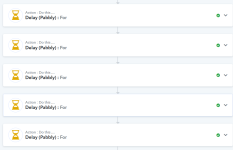
I tried add Delay step after the Iterator, but why it will loop the Delay Step like the screenshots:

Task History ID - IjU3NjUwNTZhMDYzZTA0MzI1MjZlNTUzNDUxMzE1MTYyNTQzNTBmMzIi_pc
 

Attachments

  • 1764413259062.png
    1764413259062.png
    74.7 KB · Views: 6
  • 1764413190452.png
    1764413190452.png
    50.8 KB · Views: 6

gpro

Member
I added Delay at the last step, it can work before.
Just don't know why it doesn't work in this week.
I think the Delay function has problem recently.
 
Last edited:

ArshilAhmad

Well-known member
Staff member
I tried add Delay step after the Iterator, but why it will loop the Delay Step like the screenshots:

Task History ID - IjU3NjUwNTZhMDYzZTA0MzI1MjZlNTUzNDUxMzE1MTYyNTQzNTBmMzIi_pc
Please allow our technical team some time to look into this issue. We will get back to you with an update soon.

Thanks & Regards,
Arshil Ahmad
Customer Support Associate
🌐 Pabbly.com
👉Rate your support
 
Top