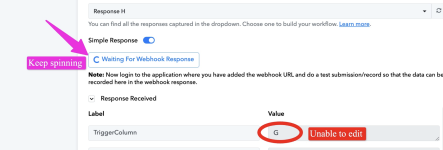
Unable to edit trigger column

TER

Member
Your Workflow URL
https://connect.pabbly.com/workflow/sendwebhookdata/IjU3NjYwNTZhMDYzNzA0MzU1MjZlNTUzYzUxMzIi_pc
Consent to Access & Modify
I authorize Pabbly Support to log in to my account and make changes to the specified workflow for troubleshooting.

Attachments

  • Screenshot 2025-11-21 at 1.33.59 PM.png
    Screenshot 2025-11-21 at 1.33.59 PM.png
    479.9 KB · Views: 28

Preeti Paryani

Well-known member
Staff member
Hello @TER,

If you wish to change the trigger column to B, you will need to update it directly from your Google Sheet settings. Please follow the steps below:

  1. Open your Google Sheet.
  2. Navigate to Extensions → Pabbly Connect Webhooks.
  3. Select Initial Setup.
  4. Change the Trigger Column from G to B.
  5. Click Submit and then send a test from the sheet.
Once the test is submitted, it will be delivered to your workflow, and the “Waiting for Webhook Response” message will no longer appear.

Please try this and let us know if you encounter any difficulties. We will be happy to assist further.
 

Preeti Paryani

Well-known member
Staff member
Hello @TER,

Thank you for sharing the screencast.

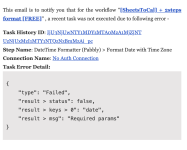
Upon reviewing it, we noticed that in the Date/Time Formatter step, the From format was not selected correctly, which was causing the issue. We have now corrected the Date/Time Formatter configurations, and the start time and end time are passing through correctly.

Please refer to the attached images for the changes made. Let us know if you face any further issues.

Before:
1767184133661.png


After:
1767184160376.png
 

TER

Member
Hello @TER,

If you wish to change the trigger column to B, you will need to update it directly from your Google Sheet settings. Please follow the steps below:

  1. Open your Google Sheet.
  2. Navigate to Extensions → Pabbly Connect Webhooks.
  3. Select Initial Setup.
  4. Change the Trigger Column from G to B.
  5. Click Submit and then send a test from the sheet.
Once the test is submitted, it will be delivered to your workflow, and the “Waiting for Webhook Response” message will no longer appear.

Please try this and let us know if you encounter any difficulties. We will be happy to assist further.
Hi Preeti, thanks for your help. The settings looks great. however, I still received an error. Please advise. thanks

Task History ID: IjU3NjUwNTY1MDYzMzA0MzA1MjZmNTUzMzUxMzI1MTYwNTQzNjBmMzgi_pc
Step Name: DateTime Formatter (Pabbly) > Format Date with Time Zone
Connection Name: No Auth Connection
Task Error Detail:

{
"status": "error",
"message": "Required field Date missing. Learn more: https://forum.pabbly.com/threads/how-to-fix-required-field-is-missing-errors-in-pabbly-connect.7488/"
}
 

Preeti Paryani

Well-known member
Staff member
Hi @TER,

Upon checking the task history, we noticed that the Google Sheets: New or Updated Spreadsheet Row trigger is capturing an empty response. Due to this, the required Date field is not being passed to the DateTime Formatter action, which is why you are seeing the “Required field Date missing” error.

This usually happens when the webhook URL is accessed directly in the browser instead of being triggered from Google Sheets via the Pabbly Connect Webhooks add-on.

1767952523553.png


1767952535105.png
 

TER

Member
Hi @TER,

Upon checking the task history, we noticed that the Google Sheets: New or Updated Spreadsheet Row trigger is capturing an empty response. Due to this, the required Date field is not being passed to the DateTime Formatter action, which is why you are seeing the “Required field Date missing” error.

This usually happens when the webhook URL is accessed directly in the browser instead of being triggered from Google Sheets via the Pabbly Connect Webhooks add-on.

View attachment 63797

View attachment 63798


Thanks Preeti, so is there something i need to do? Pls advise thanks
 

Preeti Paryani

Well-known member
Staff member
Hi @TER,

No action is required from your end. Please avoid accessing the webhook URL directly in the browser.

Let us know if you need any further assistance.
 
Top