"Waiting for Webhook Response to connect Facebook Leads Ads to Mailerlite

Your Workflow URL
https://connect.pabbly.com/workflow/share/DkYAMgNUCWpVHwJoVDEBJltPAgYAWQBiBx4IGlxTAXlVGwFUDUxYMgpGBSdUE1U0VRwAag9QUDBcSAEFUgRWJVVMAAIGBVErVBkAe1cOADMOUAAoA2I#
Consent to Access & Modify
I authorize Pabbly Support to log in to my account and make changes to the specified workflow for troubleshooting.
Hi, I hope you are well. :)

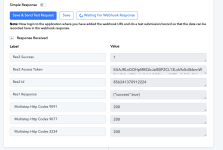
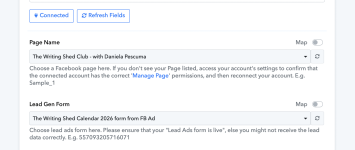
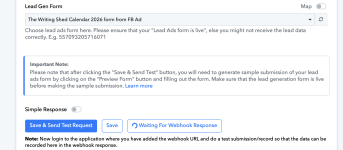
I'm trying to set up a new workflow using the New Instant Lead trigger for Facebook Lead Ads (I want to connect it to Mailerlite). My profile is connected and I can select the page and form but when I test the trigger I just get the response "Waiting for Webhook Response" - it keeps "turning" and the response never comes.

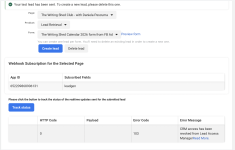
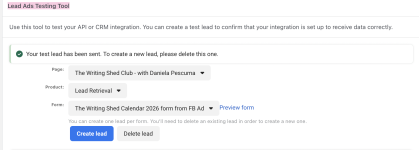
Everything seems to be connected to my Facebook Ads account, and when I test on Lead Ads Testing Tool (Facebook), I get a message that the test has been sent (attached), but when I go back to my workflow, there's no email field in the data processed (attached screenshot).

I've tried many times, deleted and (re)created the workflow many times, but I'm not sure what I'm doing wrong.

Could you please help?

Thank you so much,
Daniela
 

Attachments

  • Screenshot 2025-12-12 at 11.29.45.png
    Screenshot 2025-12-12 at 11.29.45.png
    476.4 KB · Views: 2
  • Screenshot 2025-12-12 at 11.28.42.png
    Screenshot 2025-12-12 at 11.28.42.png
    214.5 KB · Views: 2

Hrishabh.pabbly

Member
Staff member
Hello @danielapescuma ,

Thank you for reaching out, and I hope you’re doing well too.

I would like to inform you that the trigger “Facebook Lead Ads: New Lead Instant” will only work if the Facebook account connected to Pabbly Connect is the owner of the Facebook Page.

If your Facebook account only has shared access (Admin, Advertiser, etc.) but is not the actual page owner, then the instant webhook trigger will not capture any leads — which is why you are seeing the “Waiting for Webhook Response” message and no email field in the test data.

If you do not own the Facebook Page, please use the following trigger instead:

Facebook Lead Ads : New Lead (Polling-based trigger)

This trigger works even when you only have shared access to the page.
 
Hello @danielapescuma ,

Thank you for reaching out, and I hope you’re doing well too.

I would like to inform you that the trigger “Facebook Lead Ads: New Lead Instant” will only work if the Facebook account connected to Pabbly Connect is the owner of the Facebook Page.

If your Facebook account only has shared access (Admin, Advertiser, etc.) but is not the actual page owner, then the instant webhook trigger will not capture any leads — which is why you are seeing the “Waiting for Webhook Response” message and no email field in the test data.

If you do not own the Facebook Page, please use the following trigger instead:

Facebook Lead Ads : New Lead (Polling-based trigger)

This trigger works even when you only have shared access to the page.
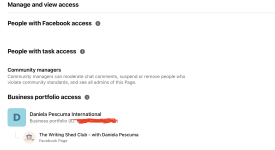
Hi, thank you so much for your reply. I am the owner of the page - I created it myself, from my own main profile. I think I'm the owner, aren't I? :) Sorry, if it's a silly question.
 

Attachments

  • Screenshot 2025-12-12 at 12.05.55.png
    Screenshot 2025-12-12 at 12.05.55.png
    493.5 KB · Views: 0

Hrishabh.pabbly

Member
Staff member
Hello @danielapescuma,

Thank you for confirming that you are the page owner.

Could you please try creating a new workflow, configure the same action step, and then test it again?
Sometimes re-creating the workflow resolves any configuration or connection issues that might be causing the trigger to not respond.

Once tested, let us know if the trigger captures the lead correctly.
 
Hello @danielapescuma,

Thank you for confirming that you are the page owner.

Could you please try creating a new workflow, configure the same action step, and then test it again?
Sometimes re-creating the workflow resolves any configuration or connection issues that might be causing the trigger to not respond.

Once tested, let us know if the trigger captures the lead correctly.
Hi, I think now I'm going somewhere - just haven't got there yet :)
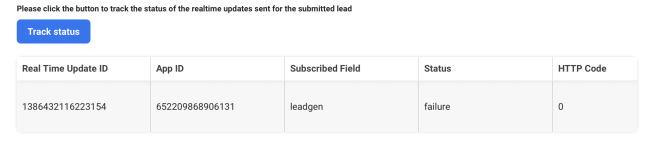
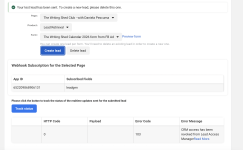
I got a different message now, that I hadn't had before (attached)
 

Attachments

  • Screenshot 2025-12-12 at 13.25.23.png
    Screenshot 2025-12-12 at 13.25.23.png
    254.1 KB · Views: 1
Top