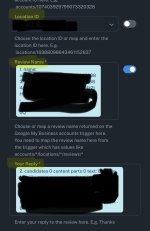
Google my business review fields

Fousey

Member
Consent to Access & Modify
I authorize Pabbly Support to log in to my account and make changes to the specified workflow for troubleshooting.
When i get a new review using Google Business profile trigger i dont get all the fields. How can i get all the fields so i can store it in my supabase database?

I need the following review fields:

  • ClientReviewURL
  • placeTitle
  • placeId
  • reviewId
  • reviewUrl
  • reviewerPhotoUrl
  • reviewsCount
  • reviewerName
  • reviewPublishedAtDate
  • stars
  • reviewText
  • totalScore
  • responseFromOwnerDate
  • responseFromOwnerText
 

Preeti Paryani

Well-known member
Staff member
Hey @Fousey,

Could you please provide us with the Workflow URL associated with your query? This will help us investigate the problem more effectively and assist you accordingly.
 

Fousey

Member
Hey @Fousey,

Could you please provide us with the Workflow URL associated with your query? This will help us investigate the problem more effectively and assist you accordingly.
Hi Preety

my workflow is as follows:

1-Google Business profile Trigger on new reviews.
2-Google AI Studio ( to generate the response)
3-Google Business Profile Reply to response.
4- Write the new reviews in supabase table

On the 4th step i dont have all the field i wish to ingest into the table.

Thank you
 

Preeti Paryani

Well-known member
Staff member
Hey @Fousey,

Could you please provide us with the Workflow URL? This will help us investigate the problem more effectively and assist you accordingly.

1768390658474.png
 

Fousey

Member
The workflow you shared does not have a Supabase action step. Please add the step to your workflow so we can look into this issue.View attachment 64020

Thanks & Regards,
Arshil Ahmad
Customer Support Associate
🌐 Pabbly.com
👉Rate your support
Hello
thank you for your reply. Actually the issue is not the supabase action but what is feeding the Supabase action. The last step provide only 3 fields from the google review as you can see in the picture i attach herr. I need a way to have access to all the fields i have listed initially in this post so i can the feed the Supabase action. Here is the last step available fields.
 

Attachments

  • IMG_4241.jpeg
    IMG_4241.jpeg
    195.3 KB · Views: 17

ArshilAhmad

Well-known member
Staff member
The 3rd step of the workflow, Create Reply, provides only two fields: the comment and the update time. This response comes from the Google Business Profile API and cannot be modified to include additional information.


You can map the data to Supabase directly from your Google Business Profile: New Review trigger step.
1768423522134.png


There are certain fields you require that do not come from the Google Business Profiles API, so you won’t be able to map those fields.

Thanks & Regards,
Arshil Ahmad
Customer Support Associate
🌐 Pabbly.com
👉Rate your support
 

Preeti Paryani

Well-known member
Staff member
Hello @Fousey,

Yes, it is possible. As shared earlier, the Create Reply action (Step 3) will only return limited fields (comment and update time) as per the Google Business Profile API response.

However, if you want to store the review details in Supabase, you can simply add the Supabase action at the end of your workflow and map the required review fields directly from the Google Business Profile: New Review trigger step (Step 1) (or any previous step where the data is available).

So, you can use the same review details that you mapped in Step 3 and map them again in the Supabase step from the trigger output.
 

Fousey

Member
Hello @Fousey,

Yes, it is possible. As shared earlier, the Create Reply action (Step 3) will only return limited fields (comment and update time) as per the Google Business Profile API response.

However, if you want to store the review details in Supabase, you can simply add the Supabase action at the end of your workflow and map the required review fields directly from the Google Business Profile: New Review trigger step (Step 1) (or any previous step where the data is available).

So, you can use the same review details that you mapped in Step 3 and map them again in the Supabase step from the trigger output.
Hi Preeti

thank you. Can you confirm that by doing what you suggest i will be ablw to retrieve the following fields:

  • ClientReviewURL
  • placeTitle
  • placeId
  • reviewId
  • reviewUrl
  • reviewerPhotoUrl
  • reviewsCount
  • reviewerName
  • reviewPublishedAtDate
  • stars
  • reviewText
  • totalScore
  • responseFromOwnerDate
  • responseFromOwnerText
Thank you
 

ArshilAhmad

Well-known member
Staff member
We have added a Text Formatter and Get Location action step to your workflow.
  • ClientReviewURL
  • placeTitle
  • placeId
  • reviewId
  • reviewUrl
  • reviewerPhotoUrl
  • reviewsCount
  • reviewerName
  • reviewPublishedAtDate
  • stars
  • reviewText
  • totalScore
  • responseFromOwnerDate
  • responseFromOwnerText
Thank you

The following fields can be fetched and passed to Supabase from the New Review trigger step (Step 1), Get Location action step (Step 3), and Create Reply action step (Step 5) of your workflow:

Place Title (Title - Get Location action step), Place ID (metadata placeId - Get Location action step), Review ID, ReviewerPhotoURL, reviewerName (reviewer displayName), reviewPublishedAtDate (createTime), stars, reviewText, responseFromOwnerDate (update time - Create Reply action step), responseFromOwnerText (Comment - Create Reply action step).

These fields cannot be fetched:
ClientReviewURL, reviewURL, reviewsCount, and totalScore.

Thanks & Regards,
Arshil Ahmad
Customer Support Associate
🌐 Pabbly.com
👉Rate your support
 

Fousey

Member
Thank you. I have realized that the workflow dosent run every 24 hr. Its been more and is still didnt run. In the history i see 0 times since dec31st knowing that 2 days ago i have received 2 new reviews. Is it normal? I have executed once the workflow manually.
How can i see the logs of everytime it is running? And is there a way to change 24hr to less?

thank you for your support.
 
Last edited:

Preeti Paryani

Well-known member
Staff member
Hello @Fousey,

Thank you for reaching out. Upon checking your workflow, we noticed that the response was captured on 14th January, which is 2 days before today. So, it seems the latest reviews you are referring to were already captured in the workflow.

1768544680560.png


Also, please note that since you are currently on the Free Plan, the workflow trigger runs at an interval of every 24 hours. The option to reduce this trigger interval is available only in the Paid Plan, and it can be reduced to as low as 10 minutes after upgrading.

To check the workflow execution details, you can review it under:
Workflow → Task History (where each run is recorded).

Let us know if you would like help in upgrading or adjusting the setup.
 

Fousey

Member
Hello

thank you. There was twonnew reviews but only the top one got the response. I had run the task but testing and runing it and the response was written. The problem is that the other review didnnot get an automated response. Is it possible to see if the response is only done on the latest review only?

thank you
 

Preeti Paryani

Well-known member
Staff member
Hello,

It seems the latest reviews received on 14th were captured in the workflow builder/test run, which is why they were not recorded in the Task History and the automated reply was not sent for them.

Also, please avoid capturing reviews repeatedly under the trigger in the workflow builder, because once a review is captured there, it may not trigger the workflow again in Task History.

We recommend waiting for new reviews and checking if they get replied automatically. If you face the same issue again for future reviews, please let us know and we’ll look into it.
 

Fousey

Member
Hello,

It seems the latest reviews received on 14th were captured in the workflow builder/test run, which is why they were not recorded in the Task History and the automated reply was not sent for them.

Also, please avoid capturing reviews repeatedly under the trigger in the workflow builder, because once a review is captured there, it may not trigger the workflow again in Task History.

We recommend waiting for new reviews and checking if they get replied automatically. If you face the same issue again for future reviews, please let us know and we’ll look into it.
thank you very much
 
Top