

Step Updating Zoho CRM "Tag" is changing other unrelated fields. Logs requested

GSG

Member
Your Workflow URL
https://connect.pabbly.com/workflow/mapping/IjU3NjcwNTZjMDYzNTA0Mzc1MjY5NTUzZDUxMzAi_pc
Your Task History ID
https://connect.pabbly.com/task/history?filter_status=applied&filter_by_workflow_id=IjU3NjcwNTZjMDYzNTA0Mzc1MjY5NTUzZDUxMzAi_pc
Consent to Access & Modify
I authorize Pabbly Support to log in to my account and make changes to the specified workflow for troubleshooting.
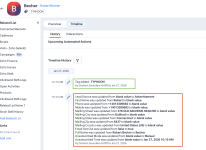
I have an automation to backfil Zoho CRM Customer "Tag" data. The 'tag' is the only data that is being updated, but, the workflow is causing multiple fields to be updated in Zoho CRM. Speaking with Zoho CRM support, they have requested logs for the workflow executions as they do not understand why additional fields are being updated. I attach a screenshot which records all of the fields that have been updated in addition to the Tag field. Most importantly the workflow is resulting in the Customer's Opt-In confirmation to become 'opted out' - apparently for no reason. The screenshopt attached shows what we are trying to achieve (green box) and what is also being changed (red box) which we dont want to change but is being updated nonetheless
 

Attachments

  • Screenshot 2026-01-27 at 10.35.52 am.png
    Screenshot 2026-01-27 at 10.35.52 am.png
    434.1 KB · Views: 5

Preeti Paryani

Well-known member
Staff member
Hello @GSG,

Thanks for reaching out to us.

To begin with, could you please confirm whether you have any other workflows in Pabbly Connect that are also updating the same customer records in Zoho CRM, apart from the workflow you have shared? This will help rule out the possibility of parallel updates coming from multiple workflows.

Additionally, for this specific workflow, if you want to verify exactly what API request is being executed and which fields are being updated, you can do the following:
  1. Go to Task History
  2. Open the relevant Task History ID
  3. Click on the specific Zoho CRM action
  4. Turn OFF the “Simple Format” toggle
  5. Copy both the Data In and Data Out details
You can then share these logs with the Zoho CRM team, which will clearly show the exact API payload sent and the response received. This should help them identify why additional fields are being updated during the request.

1769510503608.png


1769510509038.png


1769510514616.png


Please try this and let us know once you have the details. We’ll be happy to assist further if needed.
 
Top