

A random API action event happens even when the workflow doesn't have it

Vyasa

Member
Your Workflow URL
https://connect.pabbly.com/workflow/sendwebhookdata/IjU3NjcwNTZkMDYzMzA0Mzc1MjY1NTUzNDUxMzIi_pc
Your Task History ID
IjU3NjUwNTY1MDYzZjA0Mzc1MjY4NTUzYzUxM2E1MTZiNTQzNjBmMzEi_pc ,
Consent to Access & Modify
I authorize Pabbly Support to log in to my account and make changes to the specified workflow for troubleshooting.
Hi I have been facing an issue in which my work flow only has 9 steps, but an extra unneeded step that I did not add is happening. I have attached the images below. I would like to know why this is happening. It's spamming my clients with unwanted messages that don't even exist in any of my workflows.

Screenshot 2026-01-29 094633.png
this is the work flow

Screenshot 2026-01-29 094842.png
the extra api action after the trigger doesn't exist in the workflow so why is this happening?

Screenshot 2026-01-28 102326.png
The user didnt even sign up for a financial statement anaylis course.

Hoping to understand possible solutions to this.
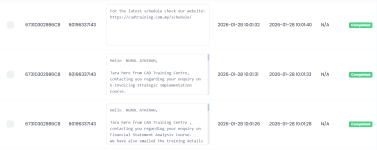
 

Attachments

  • Screenshot 2026-01-28 102326.png
    Screenshot 2026-01-28 102326.png
    86.9 KB · Views: 12

Hrishabh.pabbly

Member
Staff member
Hi @Vyasa ,

Thank you for sharing the workflow URL, Task History ID, and screenshots.

Upon reviewing the task history, we can see that an API step (Execute API Request) is being executed, even though this step is not currently present in the workflow.

To help us identify the root cause, could you please confirm:
  • Whether this API step was added earlier and later deleted from the workflow?
  • And kindly share the workflow URL of the other workflow where you’re observing the same behavior.
This information will help us trace why the step is still appearing in the task history and resolve the issue as quickly as possible.

Looking forward to your response.
 

Vyasa

Member
Hi @Vyasa ,

Thank you for sharing the workflow URL, Task History ID, and screenshots.

Upon reviewing the task history, we can see that an API step (Execute API Request) is being executed, even though this step is not currently present in the workflow.

To help us identify the root cause, could you please confirm:
  • Whether this API step was added earlier and later deleted from the workflow?
  • And kindly share the workflow URL of the other workflow where you’re observing the same behavior.
This information will help us trace why the step is still appearing in the task history and resolve the issue as quickly as possible.

Looking forward to your response.
Hi, we added the router later and what i did was i cloned this from another workflow since the steps were similar but just the data was different. So you could say it was added and then deleted.

https://connect.pabbly.com/v2/app/w...KDGkKHgsPVwECcVROACxcX10nBEkIcwFIDzwAXlN7B2Y# (The other workflows link)
 

Hrishabh.pabbly

Member
Staff member
Hi @Vyasa ,

Thanks for the update. We’ve escalated this issue to our technical team for investigation. They’re actively working on it, and we’ll update you as soon as we have more information.

Appreciate your patience.
 

Vyasa

Member
I also want to add this time, in the E-Invoice Workflow, one of our customers got two spam style messages of the Financial Statement Analysis Course after they got the correct E-Invoice message. It would be great to understand why this is happening.
 

Preeti Paryani

Well-known member
Staff member
Hi @Vyasa,

Thank you for following up.

Regarding the additional messages sent in the E-Invoice workflow, could you please share the task histories associated with the multiple messages, or the email ID / any identifying details of the specific customer who received them? This will help us investigate the issue more accurately and assist you further.

As for the previously escalated issue, we have not received an update from the technical team yet. However, we have followed up with them again. Once we have any updates, we will get back to you immediately.

Thank you for your patience and cooperation.
 

Vyasa

Member
Hi @Vyasa,

Thank you for following up.

Regarding the additional messages sent in the E-Invoice workflow, could you please share the task histories associated with the multiple messages, or the email ID / any identifying details of the specific customer who received them? This will help us investigate the issue more accurately and assist you further.

As for the previously escalated issue, we have not received an update from the technical team yet. However, we have followed up with them again. Once we have any updates, we will get back to you immediately.

Thank you for your patience and cooperation.
sure,

Task History ID -

IjU3NjUwNTY1MDYzZjA0MzE1MjZmNTUzMTUxMzM1MTYxNTQzNDBmMzYi_pc​


Preeti Paryani

Well-known member
Staff member
Hi @Vyasa,

Thank you for sharing the task history ID.

Upon checking the workflow, we can see that the same workflow is receiving the text, email, and phone number in the input, and we were not able to find any duplicate task history being generated from this workflow.

However, within the same workflow, there are two API actions configured that are sending messages to the specific number. These appear to be intentional based on the current setup.

Apart from this, we could not find any other task history or execution under this workflow that would explain the additional messages. Could you please check from your end whether the messages might have been sent manually or triggered via any other workflow?

For reference, this is the workflow we reviewed:
https://connect.pabbly.com/v2/app/workflow/mapping/IjU3NjcwNTZkMDYzMzA0Mzc1MjY1NTUzNDUxMzIi_pc

Please let us know your findings so we can assist you further.
 

Vyasa

Member
I have checked on my end and in the task history workflow it shows the ghost api action event. I have checked my other workflows and nothing has been triggered. But when i checked the whatsapp messages, it shows the unnecessary messages have been sent twice.

Yes all our workflows send the course details first as one api action event, and the next message is a link for the schedule as another api action event. These are the only two message action events. There shouldnt be one at the start of the workflow. Do you know why this is happening?

1769760031211.png

Have y
 

Preeti Paryani

Well-known member
Staff member
Hi,

Thank you for checking this in detail and for sharing your observations.

At the moment, we do not have a clear explanation for why this happened. After reviewing the workflow, we could not find any task history or action execution that would have triggered the additional or unintended messages. Based on our findings, it does not appear that these messages are being sent by this workflow.

Since there is no corresponding task history or action logged for those messages, the source seems to be outside of the workflow execution itself. We recommend continuing to monitor this behavior, and if it happens again, please share the exact timestamp along with the task history ID so we can investigate further.
 

Vyasa

Member
Hi, What do you suggest we do? It's happening for all the customers who sign up now. It'll be a problem if this continues.

Task History ID -

IjU3NjUwNTY1MDYzZjA0MzM1MjZlNTUzNDUxM2E1MTY3NTQzMDBmMzki_pc (the new task id and everytime i test it, it happens)​


Preeti Paryani

Well-known member
Staff member
Hi @Vyasa,

Thank you for sharing the details again.

Upon checking the task history, we can only see one task execution for today, and based on the logs, the messages are being sent only once from this workflow. Additionally, we noticed that this workflow is currently disabled.


Based on our understanding, it is possible that another workflow is also getting triggered when the same trigger event occurs, which could explain why messages are being sent multiple times.

Since this workflow is now disabled, we kindly request you to check from your end whether, after submitting the form, any other workflow is getting triggered or if any action is still taking place.

If possible, please share the form link with us. This will allow us to submit a test entry from our end and identify which workflow is getting triggered and causing the issue.

Looking forward to your response so we can assist you further.
 

Hrishabh.pabbly

Member
Staff member
Hello @Vyasa ,

Thank you for your patience.

We’d like to inform you that the issue where the deleted API step was still executing in the workflow and causing unexpected actions has now been successfully resolved.

Please monitor your workflow and let us know if you notice anything unusual or need further assistance. We’ll be happy to help.

Thank you for your cooperation.
 
Top