Syncing Pabbly Chatflow Tags with Zoho CRM Lead Tag

Your Workflow URL
https://connect.pabbly.com/v2/app/workflow/mapping/IjU3NjcwNTZjMDYzNTA0MzA1MjZhNTUzZDUxM2Ii_pc
Your Task History ID
IjU3NjUwNTY0MDYzNzA0MzI1MjY4NTUzYzUxMzU1MTZiNTQzNTBmMzMi_pc
Consent to Access & Modify
I authorize Pabbly Support to log in to my account and make changes to the specified workflow for troubleshooting.
Hi,
I'm trying to sync tags between Pabbly Chatflow to Zoho CRM Leads.
However, it only works when I add all tags to the contacts. If I add fewer tags or single tags, it gives me an error.

Screenshot 2026-02-10 at 3.43.26 AM.png


Please help me solve this issue.
 

Preeti Paryani

Well-known member
Staff member
Hi @Hasan Jubair,

Thanks for reaching out.

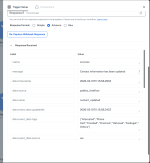
Upon checking the workflow, we noticed that the tags mapped from the trigger are not always present—sometimes they are missing in the trigger response. Due to this missing mapped data, the Add Tag action throws an error.

To resolve this, please:
  1. Open the Pabbly Chatflow trigger.
  2. Change the Response Format to Advanced.
  3. Click Re-capture Webhook Response.
  4. Update a contact that has multiple tags so the complete tag data is captured.
Once done, please let us know. We’ll review the workflow further and suggest the required steps to help you achieve the use case without errors.

1770717015075.png
 
I've updated the trigger and response with all tags.
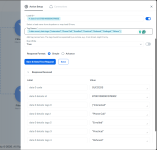
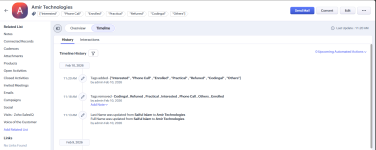
In advance mode, they have double quotation. Which doesn't match with zoho crm tags. See Screenshots:
 

Attachments

  • Screenshot 2026-02-10 172536.png
    Screenshot 2026-02-10 172536.png
    92.5 KB · Views: 10
  • Screenshot 2026-02-10 172251.png
    Screenshot 2026-02-10 172251.png
    123.3 KB · Views: 10
  • Screenshot 2026-02-10 172613.png
    Screenshot 2026-02-10 172613.png
    124.7 KB · Views: 11

Preeti Paryani

Well-known member
Staff member
Hey @Hasan Jubair,

Thanks for sharing the details.

We have added Text Formatter steps in your workflow to remove the extra double quotes and array brackets [] from the tags. After applying these changes, the workflow is now working correctly.

Please refer to the attached image for a better understanding of the setup. Let us know if you need any further assistance.

1770724651457.png
 
Top