• Instructions to Ask a Question

    For any assistance, please click the "Ask a Question" button and select the Pabbly product for which you require support.

    We offer seven comprehensive applications designed to help you efficiently manage and grow your business:

    Our support team endeavors to respond within 24 business hours (Monday to Friday, 10:00 AM to 6:00 PM IST). We appreciate your understanding and patience.

  • Due to Holi celebrations, our team will have limited availability. While we’ll continue to monitor threads, responses may be slightly delayed. Normal operations will resume on Thursday, 5th March 2026.

How to add whatsapp group link in template

Preeti Paryani

Well-known member
Staff member
Hello @LCRPAY,

To create a WhatsApp template with a CTA button that allows users to join a WhatsApp group, please follow these steps in Pabbly Chatflow:
  1. Go to the Templates section and click Create Template.
  2. Select the appropriate category and language for your template.
  3. Add your Header, Body, and Footer content as required.
  4. Scroll down to the Buttons section and choose CTA Buttons.
  5. Select Static Link as the button type.
  6. Enter your WhatsApp group’s join link (for example: https://chat.whatsapp.com/xxxxxxxxxxx) as the URL.
  7. Save and submit the template for approval.

1757663779028.png
 

Nitin

Member
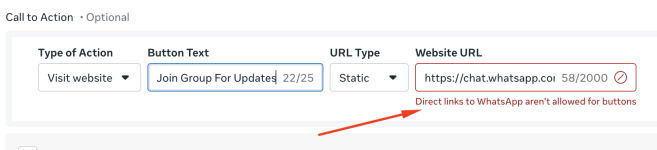
Hi , this action is not allowed - PFA screen shot , how do i add - contact to WhatsApp group ?

Direct link to whatsapp arent alowed , Alternate i can use Bitly URL
 

Attachments

  • Whatsapperror.png
    Whatsapperror.png
    114.8 KB · Views: 15
Last edited:

ArshilAhmad

Well-known member
Staff member
Yes, direct links to WhatsApp aren’t allowed as buttons—this is a restriction from Meta’s end. It looks like you’re now using a different link that redirects users to a website where they can find the WhatsApp group URL, which is the correct approach.

Thanks & Regards,
Arshil Ahmad
Customer Support Associate
🌐 Pabbly.com
👉Rate your support
 
Top