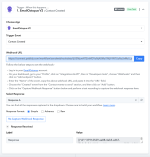
data coming through as a long string

andrear

Member
Your Workflow URL
https://connect.pabbly.com/workflow/mapping/IjU3NjcwNTZjMDYzZjA0MzA1MjZmNTUzZDUxM2Ii_pc
Consent to Access & Modify
I authorize Pabbly Support to log in to my account and make changes to the specified workflow for troubleshooting.
Response comes through from emailOctopus as a long string (with all fields) when creating a new client. See below. Was in fields before. So cannot select individual data to send. Please let me know how to deal with this. Thanks

[{"id":"b2c67abe-c565-41cf-8f69-a7963c8e89a5","type":"contact.created","list_id":"8b602f7a-fc31-11ef-91d1-3f9b575f27d1","contact_id":"acba5342-10dc-11f1-a1e8-1b4d501b40b6","occurred_at":"2026-02-23T17:25:40+00:00","contact_fields":{"Date":"2026-02-23","Address":null,"LastName":"rosen","FirstName":"andrea"},"contact_status":"SUBSCRIBED","contact_email_address":"[email protected]"}]
 

Preeti Paryani

Well-known member
Staff member
Hi @andrear,

Upon reviewing your setup, it appears that the response has been captured in Advanced Format, which is why the output is appearing in a single line (raw JSON format).

To receive the response in a structured key-value format, please follow the steps below:
  1. Open your workflow.
  2. Go to the Trigger step.
  3. Change the response format from Advanced to Simple.
  4. Click on Re-capture Webhook Response.
  5. Perform the trigger event again from your trigger application.

1771920085433.png


Once done, the response should be captured in a proper key-value structure.

Please try this and let us know how it goes.
 

andrear

Member
Thank you. I had changed it to advanced because simple was doing this as well. I created a new workflow and selected "Simple", not Advanced and the same thing happened. This is the link to the new workflow. Thank you for your time.


ArshilAhmad

Well-known member
Staff member
You need to select Simple Response, then click on the Re-Capture Webhook Response button and create a new contact in EmailOctopus to fetch the response in separate fields. Please follow these exact steps, and it should help you capture the response in the desired format.
1772217325025.png


Thanks & Regards,
Arshil Ahmad
Customer Support Associate
🌐 Pabbly.com
👉Rate your support
 

andrear

Member
Thanks again. Cleared the cache and once again created a new workflow and made sure to select simple response. It definitely stayed on the simple response format, but came through as a single string. See attached
 

Attachments

  • screenshot-pabbly.png
    screenshot-pabbly.png
    233.6 KB · Views: 13

ArshilAhmad

Well-known member
Staff member
The response is still captured in Advanced Format.
1772304214239.png


Anyway, we have added a JSON Extractor as step 2 of your workflow. You can map the data from this step wherever you want.
1772304451376.png


Thanks & Regards,
Arshil Ahmad
Customer Support Associate
🌐 Pabbly.com
👉Rate your support
 

andrear

Member
Also, once again, in the last step defaulted to advanced. Not sure why but when I selected simple seems ok, but then when I hit refresh it switches to advanced.
 
Top