
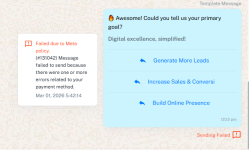
(#131042) Message failed to send because there were one or more errors related to your payment method.

vivek@u

Member
Grant Account Access for Support
  1. I authorize the Pabbly Support Team to access my account for troubleshooting purposes.
WhatsApp Number
9625739455
Email Address
[email protected]
Hi,

We are trying to send Template Message to contact from Pabbly Chatflow, we have approved template from meta, payment method also added and correct.

Still getting issue: (#131042) Message failed to send because there were one or more errors related to your payment method.

We also have credits available.
 

Attachments

  • 1772367901157.png
    1772367901157.png
    136.7 KB · Views: 4

ArshilAhmad

Well-known member
Staff member
Hi @vivek@u,

The message is coming from Meta's end. The error you are receiving is related to your payment method. Please note that in order to send templates, you must have a valid payment method added along with your tax details.

When you log in to business.facebook.com, you should also be able to see a warning under the concerned portfolio where your specific number is included. This corresponds to the error message shown below:

Failed due to Meta policy.
(#131042) Message failed to send because there were one or more errors related to your payment method.


1772223366432.png

Kindly update your payment method and tax details to resolve this issue.

Also, make sure to add a GST number to your WhatsApp Business Platform, as a valid GST number is required to use the WhatsApp Business Platform for businesses operating in India.

Please check out the video shared below to understand how you can add a payment method and GST details to your WhatsApp Business account.

Thanks & Regards,
Arshil Ahmad
Customer Support Associate
🌐 Pabbly.com
👉Rate your support
 
Top