• Instructions to Ask a Question

    For any assistance, please click the "Ask a Question" button and select the Pabbly product for which you require support.

    We offer seven comprehensive applications designed to help you efficiently manage and grow your business:

    Our support team endeavors to respond within 24 business hours (Monday to Friday, 10:00 AM to 6:00 PM IST). We appreciate your understanding and patience.

  • Due to Holi celebrations, our team will have limited availability. While we’ll continue to monitor threads, responses may be slightly delayed. Normal operations will resume on Thursday, 5th March 2026.

Blog worflow not sending image to LinkedIn

Healthii

Member
Hello, I am trying to work out how to get an Image showing on my workflow to LinkedIn. It seems everything else is going thorugh but not showing any images. How can I update this? I am using V2 .

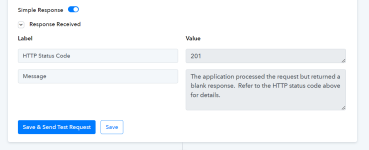
Image shows error message, and LinkedIn view of workflow result.
Thank you
 

Attachments

  • linkedIn pabbly response.png
    linkedIn pabbly response.png
    41 KB · Views: 114
  • linkedin image not showing.png
    linkedin image not showing.png
    52 KB · Views: 110
D

Deleted member 15445

Guest
Hey @Healthii

We had a look into your workflow and it appears that the URL you are providing, is not publicly accessible. The image URL that you use, should not be private.
1721909185165.png

Further, we recommend you using LinkedIn "Create Company Text Post with Image" action step.
1721909171793.png


Let us know if it works for you.
 
Top