
• ⚠️ Important: This forum is being discontinued.

    We've moved community discussion to a new platform — better search, faster replies, and tighter integration with the Pabbly apps you already use.

    • Sunset date: 23 July 2026 (this forum will go offline after that)
    • Until then: Login remains available for 30 days
    • Continue the conversation: https://sales.pabbly.com/forum

Bug with date interval in subscriptions view

Browser: Firefox 95.0.1

Step to reproduce:
* Go to https://payments.pabbly.com/app/subscription/1/all/
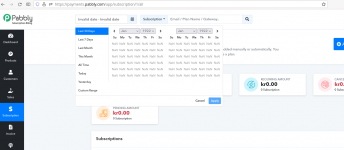
* Click Date interval and select "All Time"

Expected result:
See subscriptions of all time

Actual results:
Can't see any subscriptions, can't change date interval anymore, only way to get back is to clear cookies. See attached

Other note: A lot of issue when using date interval in Google Chrome as well, please test the feature more in different browsers
 

Attachments

  • Screenshot from 2022-01-07 10-27-11.png
    Screenshot from 2022-01-07 10-27-11.png
    91.9 KB · Views: 232
A

Avneesh

Guest
Thank you for reporting this to us. We would suggest you clear all the cache data once and continue using Pabbly Subscription Billing. The date range issue would be fixed.

Also, we've tested it in Google Chrome, Microsoft Edge, Safari(Mac) and Mozilla firefox too. It's working fine. Although, we'll have it checked in other browsers too.

1641637227898.png
 
Last edited by a moderator:
Thank you, "All Time" works now

Another issue I noticed now is that if you select "Last Month" now in January 2022 it sets interval to "Dec 1, 2022 - Dec 31, 2022" but it should be "Dec 1, 2021 - Dec 31, 2021"
 
A

Avneesh

Guest
Hello, we reviewed it on our end in all the above mentioned browsers and it's working fine on our end. Again, we would suggest you to clear all the cache/cookies and try again. If the problem still persistsm, do share a screenshot.

1641819501992.png
 
Top