Cancel Appointment in Acuity to Delete Row in Google Sheets
Status: Closed · Asked by Dr Julius on · 0 views
Hello,
I am seeking guidance in setting up how to delete a row in Google Sheets after the client cancels an appointment in google Sheets.
I have: 1)Set the trigger to Appointment Cancelled (In Acuity)
2) Set an action to Lookup spreadsheet rows in Google Sheet
3) Set an action to Delete Row
Problem: I have identified that the "end row" would be the index row, what should the start row be? The instructions said the "start row" "Enter the start row number of Spreadsheet to be deleted. Note that it will delete the next row available just after the start row number which is set.", which means it should be the row above, so what value should it be linked it?
Hey @Dr Julius
3) Set an action to Delete Row
Problem: I have identified that the "end row" would be the index row, what should the start row be? The instructions said the "start row" "Enter the start row number of Spreadsheet to be deleted. Note that it will delete the next row available just after the start row number which is set.", which means it should be the row above, so what value should it be linked it?
You can refer to the following thread regarding deleting the row from your Google Sheets.
https://forum.pabbly.com/threads/query-regarding-calendly-google-sheet-integration-through-pabbly.1387/#post-6494
Thank you! Can you also direct me to the workflow that speaks to Rescheduling and Edit Forms where changes are made in Google Sheet?
Hey @Dr Julius
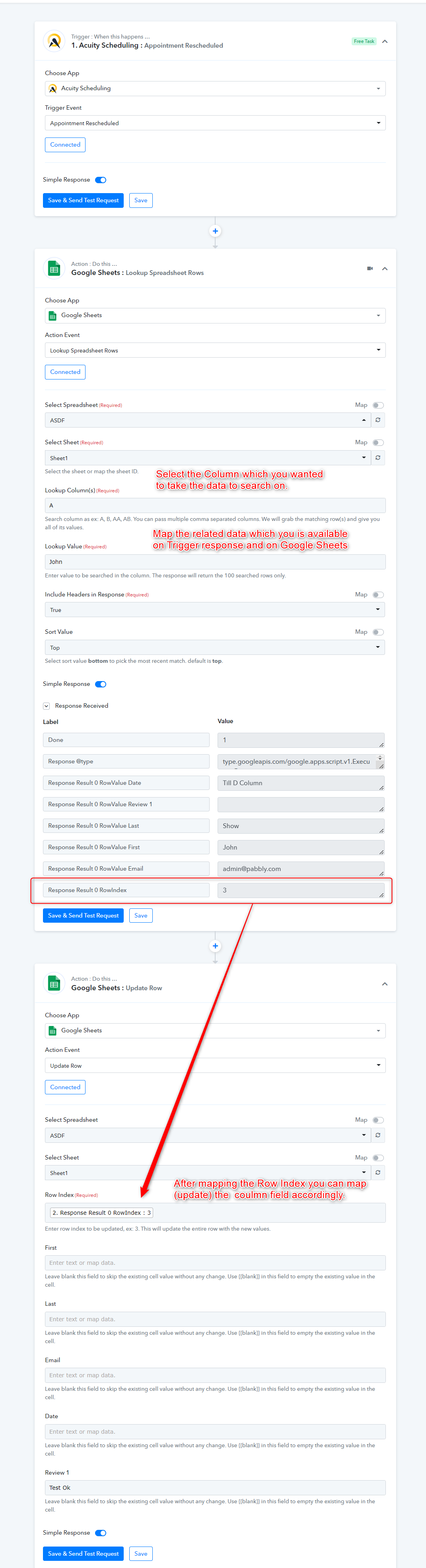
You can follow the instructions as mentioned in the screenshot then try this at your end.
Let us know if you get stuck at any step.
Mentioned workflow - https://connect.pabbly.com/workflow/share/XRVWZAJRCC9UHVQ-VDFQegEWAhEASgBWUjUJGw##
Thank you for your response. I have fixed the delete row issue.
Now, I am trying to update the spreadsheet row if the client clicks on "reschedule" or "edit form" in Acuity
Hey @Dr Julius
You can check out the following screenshot for your above concerning use case.