• Instructions to Ask a Question

    For any assistance, please click the "Ask a Question" button and select the Pabbly product for which you require support.

    We offer seven comprehensive applications designed to help you efficiently manage and grow your business:

    Our support team endeavors to respond within 24 business hours (Monday to Friday, 10:00 AM to 6:00 PM IST). We appreciate your understanding and patience.

  • Due to Holi celebrations, our team will have limited availability. While we’ll continue to monitor threads, responses may be slightly delayed. Normal operations will resume on Thursday, 5th March 2026.

Cloudconvert issue

dittdesign

Member
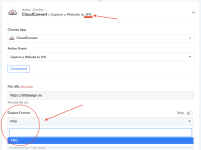
If I choose "Capture a website to JPG", my only choice for output format is PNG?!?!?
 

Attachments

  • Screenshot 2022-11-04 at 11.41.38.png
    Screenshot 2022-11-04 at 11.41.38.png
    176.3 KB · Views: 162
P

Pabblymember11

Guest
Hey @dittdesign

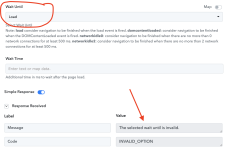
We have checked the same with the tech team and the "Load" option is currently not working from their end.

So, you can try the "Dom Content Loaded" option in Wait Until field.

1667563919052.png


1667563957837.png
 

dittdesign

Member
"Load" didn't work but the others did so I am ok.
Do you have any tutorials on cloudconvert -> create new watermark? I can't understand what kind of Task ID it should be in the input??!! I have tried all ID's in previous steps. My workflow where I test this is called switcy. The watermark step is at the bottom/end.
 
P

Pabblymember11

Guest
"Load" didn't work but the others did so I am ok.
Do you have any tutorials on cloudconvert -> create new watermark? I can't understand what kind of Task ID it should be in the input??!! I have tried all ID's in previous steps. My workflow where I test this is called switcy. The watermark step is at the bottom/end.
Kindly try passing the Task Id which has the image format of PNG as mentioned in the help text.

1667626268220.png
 
Top