Conditional output to Google sheet
Status: Closed · Asked by Lars on · 0 views
I'm automating FB leads -> Google sheet. One of the fields in the leads form is a yes/no and needs to be transformed to either a TRUE or a FALSE for output into a specific column in the sheet. I can't find the solution for this, any tips?
Thanks,
Lars.
Hey @Lars !
You can make use of "Lookup" table after your "Facebook Leads" step as shown below-
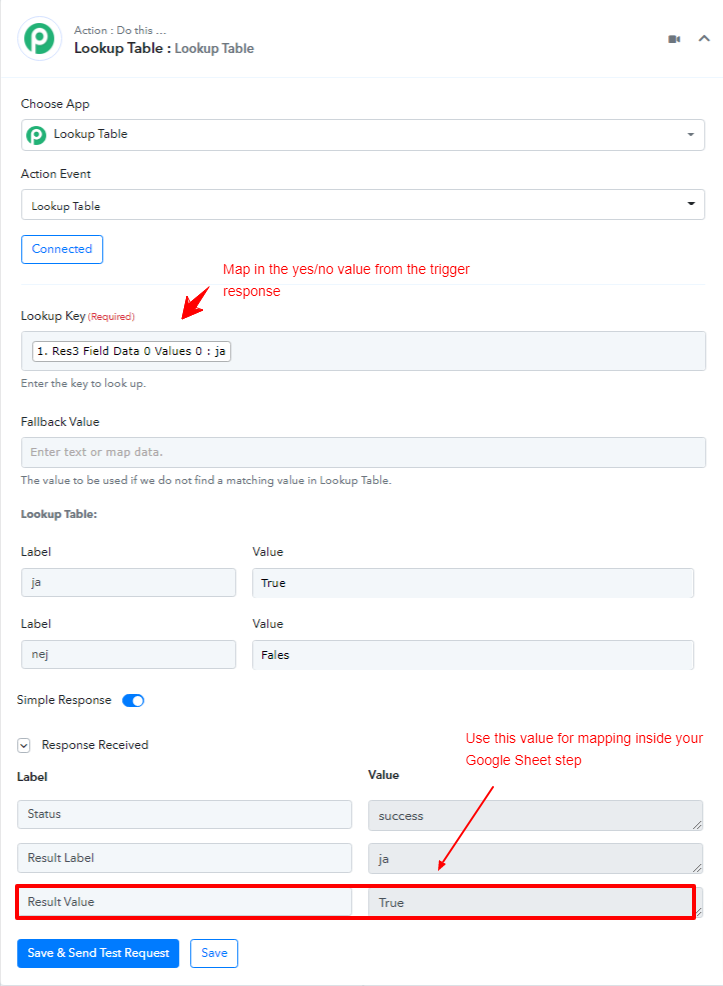
Here is a video tutorial for reference-
youtube.com/watch?v=0umsoycOlfo
Kindly check on this and let us know if this works for you.
Hey, excellent, thanks. And is there a way to trigger alternate steps depending on the result? Like IF a THEN GOTO STEP x?
Hey @Lars !
Sure, you can check for the Router step, which will work for you as per the filter condition you will set up.
Kindly check on this video tutorial on how Routers can work for you-
youtube.com/watch?v=6XDASZVv3tw
Hope, this can work for you.
Hey @Lars !Sure, you can check for the Router step, which will work for you as per the filter condition you will set up.
Kindly check on this video tutorial on how Routers can work for you-
youtube.com/watch?v=6XDASZVv3tw
Hope, this can work for you.
Right, but when I add that app I get an error that it should be the last step in the workflow. So what do I do if I want a router step in the middle of the workflow which jumps to step A or B depending on previous input?
Hey @Lars !
The Router steps are always the last step.
So you need to make the router step in last and then add your steps inside the routes in order to execute further for each individual path.
For reference, you can check on this thread on how it is done- https://forum.pabbly.com/threads/how-can-i-configure-the-zenler-course-enrollment-efficiently-in-pabbly-connect.118/
Hope, this can work for you.
I see. And since it doesn't look like steps can be moved around, this means that I need to recreate steps that I've previously created and now realize I want to place in routed branches?
Hey @Lars !
That's correct.
You will be required to make new steps inside the Router.