

• Instructions to Ask a Question

    For any assistance, please click the "Ask a Question" button and select the Pabbly product for which you require support.

    We offer seven comprehensive applications designed to help you efficiently manage and grow your business:

    Our support team endeavors to respond within 24 business hours (Monday to Friday, 10:00 AM to 6:00 PM IST). We appreciate your understanding and patience.

  • Due to Holi celebrations, our team will have limited availability. While we’ll continue to monitor threads, responses may be slightly delayed.

Dropbox: Upload File [ Error ]

Praveen

Member
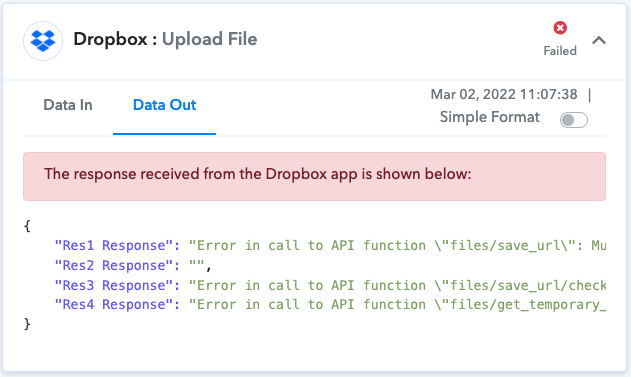
Dropbox: Upload File action is giving me the following error:
1646219474146.png


Data In:
{
"Api Endpoint Url": "https://api.dropboxapi.com/2/files/save_url",
"Path": "/Udemy course images/Interview Essentials- Job Interview Techniques That Work.jpg",
"Url": "https://img-c.udemycdn.com/course/304x171/4323114_c0a8_2.jpg"
}

Data Out:
{
"Res1 Response": "Error in call to API function \"files/save_url\": Must provide HTTP header \"Authorization\" or URL parameter \"authorization\".",
"Res2 Response": "",
"Res3 Response": "Error in call to API function \"files/save_url/check_job_status\": Must provide HTTP header \"Authorization\" or URL parameter \"authorization\".",
"Res4 Response": "Error in call to API function \"files/get_temporary_link\": Must provide HTTP header \"Authorization\" or URL parameter \"authorization\"."
}
 
P

Pabblymember11

Guest
Hey @Praveen

As we can see from your workflow execution, it seems like at that very moment DropBox didn't process your API call. Since the request to the DropBox server was sent properly.

We would suggest your check the data once which you are trying to pass and then try re-executing it.

2022-03-03_11h47_31.png
 
Top