NOVUSRAD
Member
Hi
Apologies if this topic has been dealt with previously.
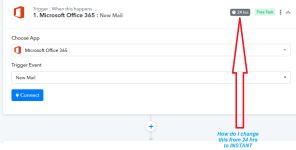
I am new to Pabbly connect and when I setup my new workflow I chose Office 365 as App and New Email as my trigger event. The trigger timer on the top right of the box shows 24 hrs. How can I change time timer to INSTANT, so I dont need to wait 24 hrs to for the workflow to check for new mail.
Please see attached image
This is my workflow link
 connect.pabbly.com
Apologies if this topic has been dealt with previously.
I am new to Pabbly connect and when I setup my new workflow I chose Office 365 as App and New Email as my trigger event. The trigger timer on the top right of the box shows 24 hrs. How can I change time timer to INSTANT, so I dont need to wait 24 hrs to for the workflow to check for new mail.
Please see attached image
This is my workflow link
Pabbly
connect.pabbly.com