
Pabbly subscription helps you to give your customers a flawless checkout experience without being redirected anywhere. You can embed your Pabbly checkout page on your website without any hassle.
How To Use It In Website?
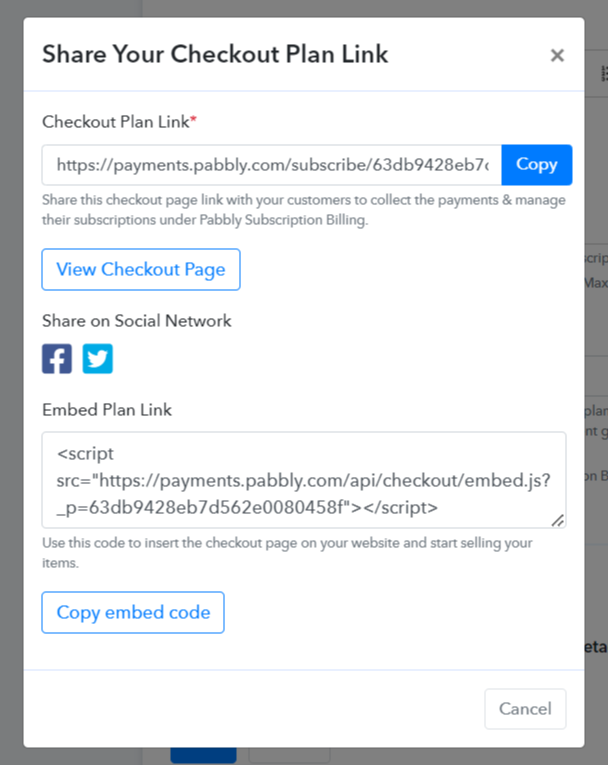
When you create a plan in your Pabbly account, an embed plan link is already generated by the system. Refer to the image.
You just need to use that code to embed the checkout page on your website and start selling your items.
Just add the code given below to your website and your checkout is embedded.
For example:
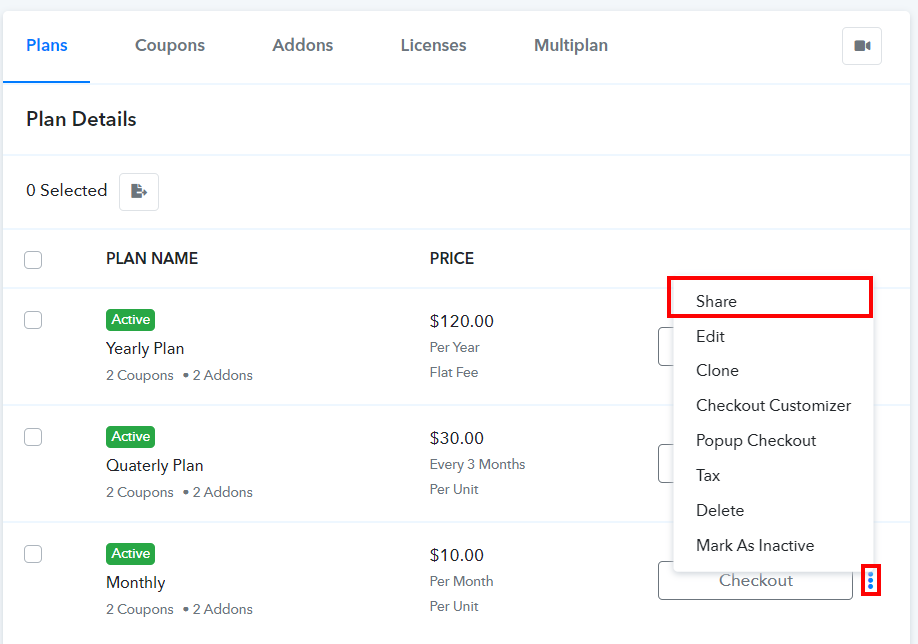
You can also get this code later by clicking the "Share" option under the plan section.
NOTE: You do not need to add/use any custom embed code/link other that the code provided by the Pabbly system, in order for your checkout page to work.
How To Use It In Website?
When you create a plan in your Pabbly account, an embed plan link is already generated by the system. Refer to the image.
You just need to use that code to embed the checkout page on your website and start selling your items.
Just add the code given below to your website and your checkout is embedded.
For example:
<script src="https://payments.pabbly.com/api/checkout/embed.js?_p=63db9428eb7d562e0080458f"></script>
You can also get this code later by clicking the "Share" option under the plan section.
NOTE: You do not need to add/use any custom embed code/link other that the code provided by the Pabbly system, in order for your checkout page to work.


