Khalipha Ndiaye
Member
Hi there,
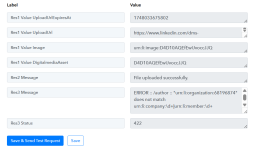
I’m have an error response when using request "Share Company Post with Image" in Pabbly Connect (look at attached screenshot)
Here’s the error response I’m receiving:
"ERROR :: /author :: "urn:li rganization:68196874" does not match urn:li:company:\d+|urn:li:member:\d+"
I've updated my LinkedIn connection as an admin of the company page. Does it look like I have to match the company and member account instead of just the company? What is the difference between "organisation" and "company" pages?
Could you please tell me how to set the author field correctly, or if there's a workaround to convert the organisation URN to a company URN in Pabbly?
Best regards,
I’m have an error response when using request "Share Company Post with Image" in Pabbly Connect (look at attached screenshot)
Here’s the error response I’m receiving:
"ERROR :: /author :: "urn:li
rganization:68196874" does not match urn:li:company:\d+|urn:li:member:\d+"I've updated my LinkedIn connection as an admin of the company page. Does it look like I have to match the company and member account instead of just the company? What is the difference between "organisation" and "company" pages?
Could you please tell me how to set the author field correctly, or if there's a workaround to convert the organisation URN to a company URN in Pabbly?
Best regards,