

Error while sending whatsapp message from wati.io (hubspot to wati)

Hi team,

After creating a complete workflow the WhatsApp message is not sent. The Result from server side is 1, but the receiver is not able to receive the message. I have mentioned the error screenshot, what can be the solution for it.
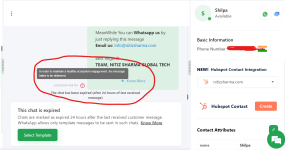
 

Attachments

  • Screenshot 2024-09-24 175021.png
    Screenshot 2024-09-24 175021.png
    129.3 KB · Views: 101

Preeti Paryani

Well-known member
Staff member
Hello @shilpa@nitizsharma

As we have checked, it seems the error arises due to the mapped data from step 1. Please refer to the attached image for more info.

json.png


To resolve this issue you can add a free step named "Text Formatter: Text Parser" in your workflow after the trigger application to extract the Data Json Name and then map the response received from step 2 in Wati, refer to the below attached images to better understand the process.

to be done.png


3.png

Kindly follow the above mentioned steps and let us know if it works for you.
 

Preeti Paryani

Well-known member
Staff member
Hello @shilpa@nitizsharma

As we have checked the "hubspot to wati test" workflow is working fine as of now, please refer to the attached screenshot for more info.

Task-History-Pabbly-Connect-09-26-2024_10_29_AM.png


If you are facing any further issues please let us know.
 

ArshilAhmad

Well-known member
Staff member
HubSpot has a trigger interval of 24 hours, so it may take up to 24 hours for the contacts you added to HubSpot to receive a message.
1727395747350.png


This trigger interval can be reduced to 10 minutes for paid plans. If you wish, you can purchase any of our plans to reduce the trigger interval.
 
Top