Facing an issue with Whatsapp API new update form Meta.

Sridhar_N

Member
Your Workflow URL
https://connect.pabbly.com/workflow/mapping/IjU3NjYwNTY0MDYzZjA0MzI1MjZmNTUzNzUxMzEi_pc
Your Task History ID
IjU3NjUwNTY1MDYzNTA0MzI1MjZlNTUzYzUxMzQ1MTZhNTQzMDBmMzQi_pc
Consent to Access & Modify
I authorize Pabbly Support to log in to my account and make changes to the specified workflow for troubleshooting.
Due to new rollout of updates,I am unable to automate the whatsapp template message with multiple button (Currently one space for a button) . Kindly share the right content or assist me with workflow.

Work flow name :US-TKGIL-24112025
 

Attachments

  • Screenshot 2025-12-29 140248.png
    Screenshot 2025-12-29 140248.png
    25.1 KB · Views: 3

Preeti Paryani

Well-known member
Staff member
Hello @Sridhar_N,

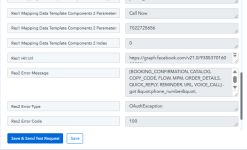
We have checked your workflow. The template you are using has a static header and static buttons, so you do not need to configure the header or button fields—only the body field is required. We have already configured this on your behalf.

1767011185673.png


However, the current error you are facing (Error 133010 – Phone number not registered) is not related to the workflow setup. This error indicates that the WhatsApp Business phone number is not registered/active on the WhatsApp Business Platform.

Kindly ensure that the phone number is properly registered and active in your WhatsApp Business account before retrying.
You can refer to Meta’s documentation here for more details:

Once the number is registered, the workflow should work as expected.
 
Top