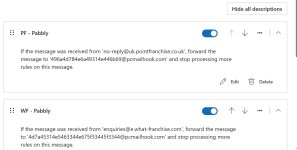
Forwarding Email to Pabbly

tfc

Member
Your Workflow URL
https://connect.pabbly.com/v2/app/workflow/mapping/IjU3NjcwNTZjMDYzMzA0MzE1MjZhNTUzMjUxMzAi_pc
Your Task History ID
IjU3NjcwNTZjMDYzMzA0MzE1MjZhNTUzMjUxMzAi_pc
Consent to Access & Modify
I authorize Pabbly Support to log in to my account and make changes to the specified workflow for troubleshooting.
I have just set up my workflows and now i have forwarded emails to each individual workflow however aside the fact that the workflows did not seem to automatically trigger, the emails are now being rejected by pabbly. Any ideas how to resolve this? I have checked the workflow email addresses and they are correct. I am still on the free version of Pabbly Connect but has not used any tasks yet so want to ensure it works before paying.
 

Preeti Paryani

Well-known member
Staff member
Hi @tfc,

Thank you for sharing the details.

Upon checking, it appears that you are using the Pabbly Email Parser to trigger the workflow via forwarded emails.

To better understand why the emails are not triggering the workflow and are getting rejected, could you please share:

  • A screenshot or screencast of the email forwarding setup from your source email application (Gmail/Outlook/etc).
  • Confirmation of the exact email address you are forwarding to (the Mail Hook email generated in the trigger step).

Once we have these details, we will be able to guide you more accurately.
 

tfc

Member
this is the email address i am using for the FD - Pabbly forwarding [email protected]
 

Attachments

  • Screenshot 2026-02-11 090839.jpg
    Screenshot 2026-02-11 090839.jpg
    117.8 KB · Views: 3

Preeti Paryani

Well-known member
Staff member
Hi @tfc,

Thank you for sharing the forwarding email address.

Upon checking your trigger, we can see that it is still showing “Waiting for Email Parser Response” and the last captured response was 6 days ago. This indicates that no email has been successfully received by the trigger.

1770804987920.png


This is the reason why the workflow is not triggering.

We recommend the following:
  1. Try forwarding a fresh email manually to the exact pcmailhook address shown in the trigger and check if it gets captured.
  2. If it still does not capture the response, please create a new workflow, copy the new Mail Hook email, and immediately forward a test email to it to capture the trigger response first.
  3. Once the response is captured successfully, proceed with setting up the remaining steps

Please test this once and let us know the result.
 

tfc

Member
Hi @tfc,

Thank you for sharing the forwarding email address.

Upon checking your trigger, we can see that it is still showing “Waiting for Email Parser Response” and the last captured response was 6 days ago. This indicates that no email has been successfully received by the trigger.

View attachment 64976

This is the reason why the workflow is not triggering.

We recommend the following:
  1. Try forwarding a fresh email manually to the exact pcmailhook address shown in the trigger and check if it gets captured.
  2. If it still does not capture the response, please create a new workflow, copy the new Mail Hook email, and immediately forward a test email to it to capture the trigger response first.
  3. Once the response is captured successfully, proceed with setting up the remaining steps

Please test this once and let us know the result.

I will try, which package do i have to pay for for the automation of the email parser to work and send through to my CRM? It is not clear and am wary about paying for this if i have to recreate a workflow every time an issue happens like this because it took a long time to do.
 

Preeti Paryani

Well-known member
Staff member
Hi @tfc,

There isn’t any separate package required specifically for Email Parser to work.

This issue does not usually happen frequently. It typically occurs if the trigger is left in “Waiting for Response” for a long time or if the Re-capture / Save & Send Test Request button is clicked again without immediately sending a fresh test email.

Once your trigger captures a response successfully, we recommend:

  • Do not click the re-capture button again unless needed.
  • Simply monitor the Task History for future executions.
Regarding pricing:

Pabbly Connect plans depend on the number of tasks you want to execute per month.
  • The trigger step is a free step.
  • Some internal Pabbly steps are also free.
  • You are charged only for paid task executions when the workflow runs.
You can choose a plan based on how many tasks you expect to use monthly. We offer monthly, yearly, and lifetime plans.

Monthly & yearly plans:
https://www.pabbly.com/connect/#pricing

1770807544990.png


Lifetime plans:
https://buy.pabbly.com/connect-onetime/

You do not need to recreate workflows regularly — once properly set up and capturing correctly, they run smoothly.

Let us know if you’d like help estimating the right plan for your usage.
 

tfc

Member
Ok I have gone through everything you advised and it seemed to work when I requested manually and then it submitted manually tony CRM, however when I automate the forwarding of emails they keep bouncing back. If I manually forward them too nothing gets added to our CRM. It seems almost as if it is set to some sort of manual only setting
 

tfc

Member
Ok I have gone through everything you advised and it seemed to work when I requested manually and then it submitted manually tony CRM, however when I automate the forwarding of emails they keep bouncing back. If I manually forward them too nothing gets added to our CRM. It seems almost as if it is set to some sort of manual only setting
Oh and I have paid now which is more annoying given this is still not working/...
 
Top