Getting Business account locked
Status: Closed · Asked by Priyanka Chinnasamy on · 0 views
My WhatsApp messages are not delivering. Getting this error
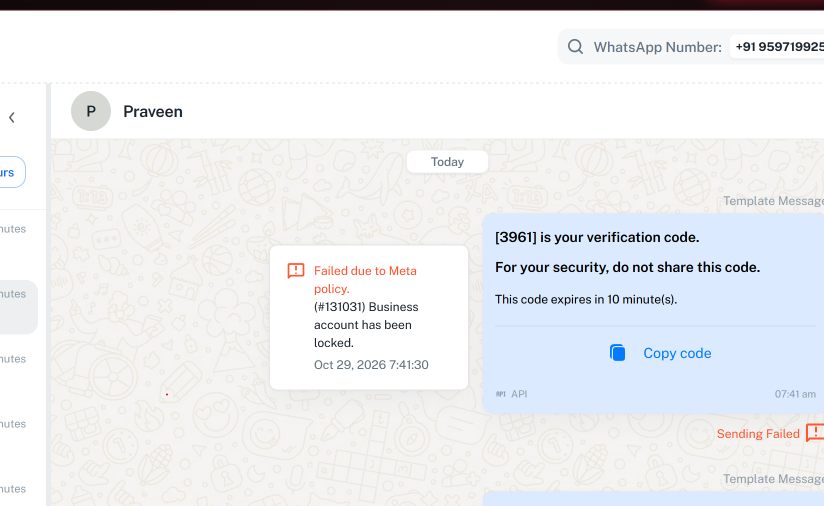
Mobile Number ID - 890805320786974
Hello Priyanka,
Thank you for contacting Pabbly Support.
The issue with messages failing to deliver is due to WhatsApp Error Code 131031 (Account has been locked). This error indicates that WhatsApp has restricted or disabled the WhatsApp Business Account for violating a platform policy, or we were unable to verify data in the request (e.g., the two-step pin is incorrect).
The WhatsApp Business Account associated with the app has been restricted or disabled for violating a platform policy, or we were unable to verify data in the request (e.g., the two-step pin is incorrect).
Causes:
Policy Violation: The account has been flagged for violating WhatsApp's platform policies.
Incorrect Data: Data in the request (like the two-step pin) does not match the data set in the WhatsApp Business Account.
Solutions:
Review Policy Violations: Refer to the Policy Enforcement document to identify violations and understand how to resolve them.
Verify Account Data: Double-check and correct any discrepancies in your account data (like the two-step pin).
Aditya Chourey
Customer Support Associate
🌐 Pabbly.com
👉 Rate your support
Black Friday Early Access

I tried to create a virtual number & trying to connect pabbly chatflow but getting this error

Hello Priyanka,
Thank you for reaching out to us again.
To help us investigate why you are encountering this error while connecting your virtual number to Pabbly Chatflow, could you please provide more details about your specific use case? Additionally, please share the exact phone number you are attempting to connect so we can review your setup.
For security reasons, please do not share sensitive personal information here; instead, kindly send these details directly to support@pabbly.com.
To allow us to investigate your account directly, please grant us permission by including the following statement in your next reply: "You have my permission to log into my Pabbly account and make changes if required. Here is the registered email address associated with it: [Your Email Address]."
Aditya Chourey
Customer Support Associate
🌐 Pabbly.com
👉 Rate your support
Black Friday Early Access
Hello
Virtual Number is +1 711-663-8707
You have my permission to log into my Pabbly account and make changes if required
Hello Priyanka,
Thank you for sharing the phone number.
Regarding the virtual number +1 7116638707, we recommend checking its eligibility for registration with WhatsApp Business Platform before connecting it to Pabbly Chatflow.
Please verify the following requirements using Meta's official documentation:
Meta – WhatsApp Business Phone Number Registration
Country and Number Eligibility: Check whether the +1 7116638707 number is eligible for WhatsApp Business Platform registration.
Number Type: Confirm whether Meta supports the number type (virtual/VoIP) provided by your service provider.
OTP Verification: Ensure that the number can receive verification codes through SMS or voice calls.
Existing Registration: Check whether the number is already registered with WhatsApp or another WhatsApp Business Platform provider.
Number Ownership: Ensure that you have access to the number to complete Meta's verification process.
Please note that not all virtual numbers are supported by Meta. The number must meet Meta's registration and verification requirements to be connected successfully.
We recommend confirming these details with your virtual number provider before proceeding with the setup.
Aditya Chourey
Customer Support Associate
🌐 Pabbly.com
👉 Rate your support
Black Friday Early Access
Hello,
Just following up on our previous email to check if you need any further assistance from our end.
Please feel free to let us know if you have any questions or concerns. We’ll be happy to assist you.
Aditya Chourey
Customer Support Associate
🌐 Pabbly.com
👉 Rate your support
Black Friday Early Access
Hi Priyanka,
We’re following up on our previous email regarding your query. As we haven’t received a response, this will be our last follow-up, and the ticket will be closed automatically.
If you still need assistance, you can email us again at support@pabbly.com to raise your concern.
Aditya Chourey
Customer Support Associate
🌐 Pabbly.com
👉 Rate your support
Black Friday Early Access