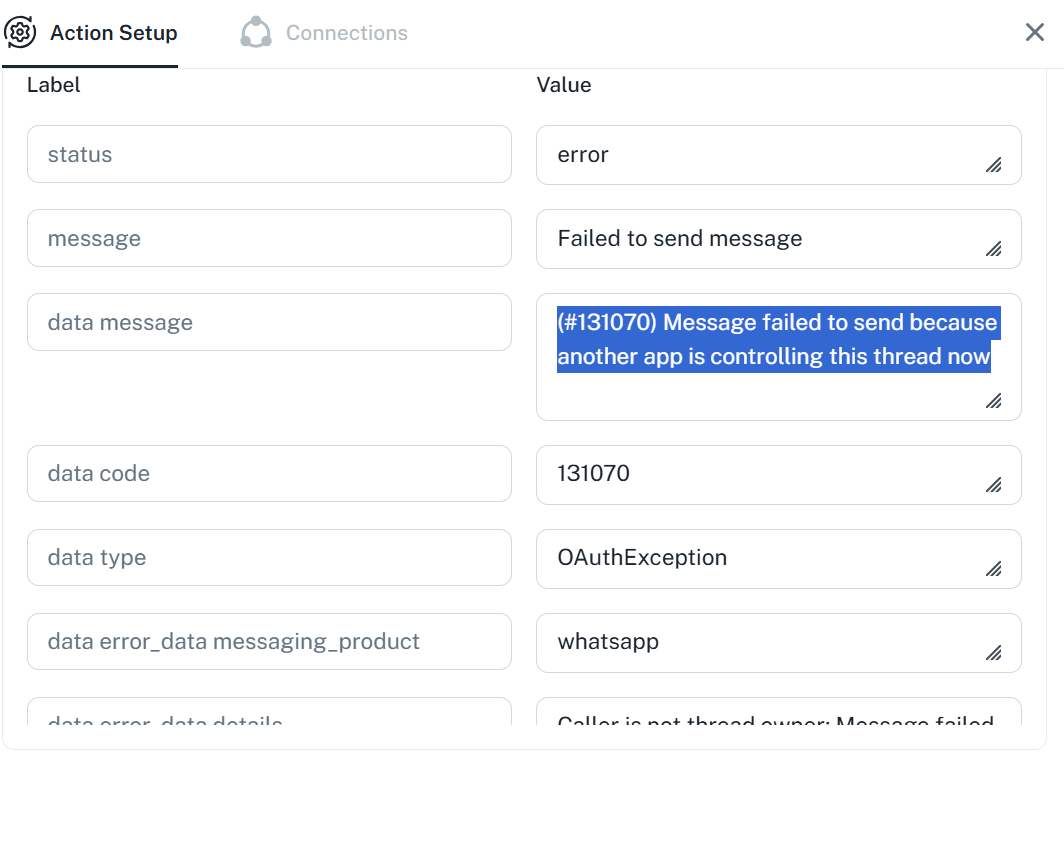
another app is controlling thread
Status: Closed · Asked by Zeus Beard oil on · 0 views
Hi,
Thank you for reaching out to Pabbly Support.
As you mentioned that you are facing an issue while connecting your WhatsApp number in Pabbly Chatflow, we have checked your account and found the following:
WhatsApp Connection: Your WhatsApp number is successfully connected to the WhatsApp Business API.
Payment Method: Meta is rejecting paid messages from your number due to an issue with the payment method, such as a declined or expired card.
Business Verification: The business verification status has not yet been checked.
To resolve this issue, please follow the steps below:
Step 1: Resolve the Payment and Business Verification Issues
Click on Manage Payment Method in the attached screenshot.
Check your existing card and update it or add a new payment method.
Set the updated payment method as the default.
Ensure that your business billing details are complete. If your business is based in India, add your GST number.
Complete the required business verification steps in Meta.
Once everything is completed, click on Refresh from Meta to update the status.
Step 2: Sync Your WhatsApp Number
Once the payment and business verification issues are resolved, go to the Published To section in Pabbly Chatflow.
Click the three dots next to your WhatsApp number.
Select Sync WhatsApp Number and wait for the synchronization to complete successfully.
Step 3: Subscribe to the WhatsApp Number
After syncing the number, click on the Subscribe option and complete the process. Please wait until the subscription is successful.
Step 4: Register the WhatsApp Number
After completing the above steps, click on the Register option.
If your number is eligible for an SMB business account, registration may be available free of charge.
If your number is not eligible for an SMB business account, follow the registration process displayed by Meta.
If the registration step does not complete successfully, but the Sync WhatsApp Number and Subscribe steps have already been completed, your WhatsApp Chatflow may still start working. However, this depends on the number's registration status and Meta's requirements.
Step 5: Refresh and Verify the Status
After completing all the above steps, please use the Refresh from Meta option and check the Manage Favorite Contacts settings as well, where applicable.
Please ensure that you complete each step carefully and allow sufficient time for Meta to update the changes. The updates may not reflect immediately if you perform all the steps one after another without waiting for the previous process to finish.
Additionally, we have checked your Pabbly Connect account and found that the following workflow is active and working successfully:
Workflow Link: https://connect.pabbly.com/v2/app/workflow/mapping/IjU3NjcwNTZiMDYzNjA0M2M1MjZjNTUzMTUxMzci_pc
For your reference, we have attached the screenshot showing the current status of your WhatsApp account.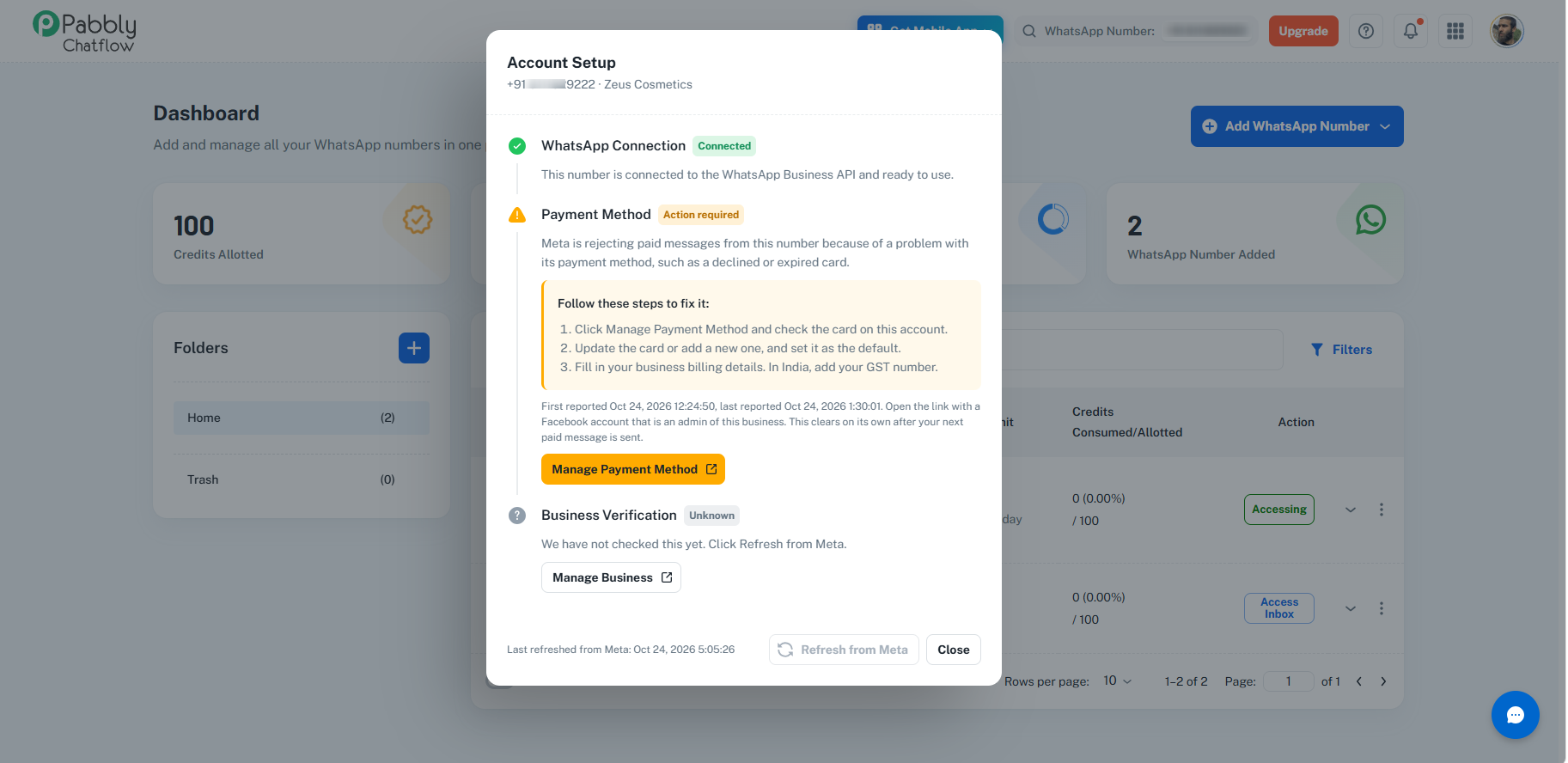
Please follow the above steps and let us know if you continue to face any issues. We will be happy to assist you further.
Aditya Chourey
Customer Support Associate
🌐 Pabbly.com
👉 Rate your support
Black Friday Early Access

Hi,
I am following up on the detailed instructions shared earlier regarding your WhatsApp connection issue.
Have you had a chance to update your payment method and complete the business verification in Meta? If you have completed these steps, please let us know whether you are still encountering any errors while syncing or subscribing your WhatsApp number in Pabbly Chatflow.
If you need any further assistance with these steps, please let us know. We will be happy to assist you.
Aditya Chourey
Customer Support Associate
🌐 Pabbly.com
👉 Rate your support
Black Friday Early Access
Hello,
We noticed that we haven’t received a response regarding your query.
As there has been no update, we are closing this support ticket for now. If you still need assistance, please feel free to open a new ticket, and we’ll be happy to help.
Aditya Chourey
Customer Support Associate
🌐 Pabbly.com
👉 Rate your support
Black Friday Early Access