How do I connect my existing WhatsApp number to Pabbly Chatflow without losing chats or disrupting regular WhatsApp?
Status: Closed · Asked by Ansh Sharma on · 0 views
I'm setting up an AI Assistant in Pabbly Chatflow for a demo. The only number I can use belongs to my mother and is currently registered in regular WhatsApp Messenger.
Meta shows this error: “This phone number is already registered to a WhatsApp account. To use this number, disconnect it from the existing account.”
We need to keep her regular WhatsApp working and preserve her existing chats. Is there a supported way to do this? Can we use WhatsApp Business App Coexistence, or would migration stop her regular WhatsApp from working?
Please confirm the safest steps before we make any changes.
कृपया हमारा ईमेल बदल दिया जाए,, हमारा ईमेल पर्सनल था अभी हम अपने टीम को यह ब्रॉडकास्टिंग करवाना चाहते हैं,, मतलब टीम के द्वारा ब्रॉडकास्टिंग करवाना चाहते हैं,, अपनी कंपनी के लिए तो हम अपनी टीम में अपना पर्सनल ईमेल नहीं देना चाहते हैं ,,इसलिए यह कंपनी के ईमेल पर ट्रांसफर कर दिया जाए,,[email hidden]
Hi Ansh,
Thank you for reaching out to Pabbly Support.
WhatsApp Business App Coexistence is designed for eligible WhatsApp Business App accounts. Since your mother's phone number is currently registered with the regular WhatsApp Messenger app, it cannot be connected directly using this feature.
If you migrate the number from regular WhatsApp Messenger to the WhatsApp Cloud API using the standard migration method, it will no longer work on the regular WhatsApp Messenger app. Therefore, your mother will not be able to continue using that number for regular personal messaging through the app.
Please also note that if you disconnect the number from its existing WhatsApp account, a cooling period may apply before you can register it again, depending on Meta's requirements.
To protect your mother's existing chats and ensure her regular WhatsApp service remains uninterrupted, we strongly advise against disconnecting or migrating her number at this stage.
For setting up and testing your demo in Pabbly Chatflow, we recommend using a separate or unused phone number instead.
Please let us know if you have any questions or need further assistance.
Aditya Chourey
Customer Support Associate
🌐 Pabbly.com
👉 Rate your support
Black Friday Early Access

Thank you for clarifying. I cannot use another phone number at the moment, and I don't want to migrate or disconnect my mother's personal WhatsApp account.
Does Pabbly Chatflow offer a free web-based sandbox, preview mode, or another way to test my AI Assistant's responses without connecting a WhatsApp number? I only need to test my Clinic Bot demo before deploying it for a client.
Thank you.
Hi Ansh,
Thank you for following up!
To proceed with setting up your WhatsApp channel in Pabbly Chatflow without disconnecting or migrating your mother's existing personal WhatsApp account, you can follow these steps:
Initiate WhatsApp Connection: Log in to your Pabbly Chatflow account, click Add WhatsApp Number, and choose WhatsApp Connect.
Select Connection Type: On the following setup screen, select the option "I want to use a number that is currently active on the WhatsApp Business app".
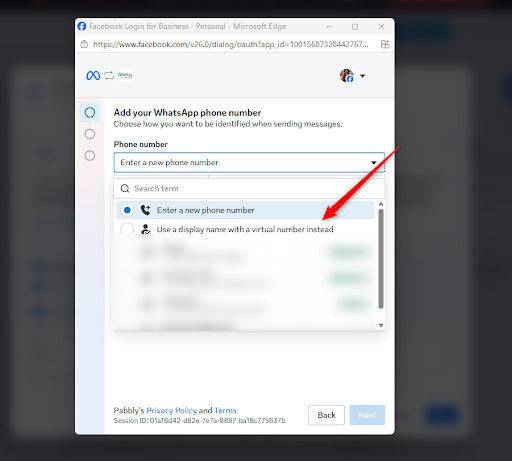
Check Virtual Number Option in Meta Signup: When the Meta signup/Facebook Login window opens, click on the Phone number dropdown menu.
Select Display Name / Virtual Number: Check if the option "Use a display name with a virtual number instead" is available in the list. If available, select this option.
Please let us know if you run into any issues during the process or need further assistance!
Aditya Chourey
Customer Support Associate
🌐 Pabbly.com
👉 Rate your support
Black Friday Early Access
Hi Pabbly Support,
I'm trying to connect a WhatsApp number to Pabbly Chatflow using Meta's signup flow. Meta displays “Assets successfully created,” but after clicking Finish, Pabbly shows:
“Couldn't connect the WhatsApp number. Invalid phone number format.”
I'm trying to use the display/virtual number option. Could you please check whether a WhatsApp phone number was actually provisioned and why Chatflow is rejecting it?
I do not have a spare physical SIM, and I cannot migrate my mother's personal WhatsApp number.
Please suggest a supported way to test my Clinic Bot without affecting her account or requiring a paid upgrade.
Hi Ansh,
Thank you for sharing the details.
To help us investigate this issue further, we request you to schedule a meeting with our team using the link below:
Schedule a Meeting: https://www.draftmeet.com/book/lnk_8e49a1c0c48d6905f57385699f3ba028
During the meeting, we can review the issue together and guide you further.
Aditya Chourey
Customer Support Associate
🌐 Pabbly.com
👉 Rate your support
Black Friday Early Access
Hi Aditya,
Thank you for offering to help. I tried opening the meeting link, but it says the link has already been used to book a meeting.
Could you please share a new meeting link?
I'm a beginner, so I'd appreciate step-by-step guidance. If possible, could you also help me resolve this issue through text support?
Thank you for your help.
Hi,
We understand that you encountered an error indicating that the previous meeting link had already been used. This may have been caused by a discrepancy with the link, so please rest assured that you can still book a meeting slot.
Kindly use the new meeting link below to select a convenient date and time according to your availability:
https://www.draftmeet.com/book/lnk_1615f26ff9978427a01ecbcb944f1917
Once your meeting is booked, we’ll connect with you at the scheduled time and assist you with your concern.
Thank you for your cooperation.
Thanks & Regards,
Shekh Dilshekh
Customer Support Specialist
🎉Black Friday Early Access
Hi Support Team,
Thank you for sharing the new booking link. Unfortunately, the available 3:30 PM slot may conflict with my school schedule.
Would it be possible to arrange a meeting at a later time, or assist me through text support instead?
Thank you for your understanding.
Hi Ansh,
We understand that the available 3:30 PM slot conflicts with your school hours and other commitments. The meeting link displays slots based on our team's current availability, which is why a different time may not be available for direct selection.
Since troubleshooting Meta's signup process and virtual number setup requires careful, real-time guidance, we recommend resolving this through a live meeting. This will allow our team to guide you through the process and help address the issue without risking any disruption to your mother's WhatsApp account.
Could you please check the meeting link again to see whether a suitable slot is available for tomorrow or the next convenient day? You can book a time that works best for you from the available options below:
Meeting Link: https://www.draftmeet.com/book/lnk_1615f26ff9978427a01ecbcb944f1917
Once you've booked a slot, our team will connect with you and guide you through the necessary steps to resolve the issue.
Thank you for your understanding and cooperation.
Thanks & Regards,
Shekh Dilshekh
Customer Support Specialist
🎉Black Friday Early AccessHi Ansh,
We are currently available for our scheduled meeting and will remain online until 3:50 PM to assist you. Please join whenever you are ready so we can look into the connection issue together.
Aditya Chourey
Customer Support Associate
🌐 Pabbly.com
👉 Rate your support
Black Friday Early Access