

Register the incoming webhook
- Open Google Chat in a web browser.
- Go to the space to which you want to add a webhook.
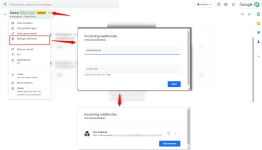
- At the top, next to the space title, click arrow_drop_down Down Arrow > Manage webhooks.
- If this space already has other webhooks, click Add another. Otherwise, skip this step.
- For Name, enter "Test Webhook".
- For Avatar URL, enter https://developers.google.com/chat/images/chat-product-icon.png.
- Click SAVE.
- Click content_copy Copy to copy the full webhook URL.
- Click outside the box to close the Incoming webhooks dialog.
Copy the Incoming Webhook URL and paste it under the action field Chat Webhook URL.
 Note: You will be able to register the webhook only if you have a Google Workspace account.
Attachments
Last edited by a moderator:


