soleimanb
Member
- Your Workflow URL
- https://connect.pabbly.com/workflow/mapping/IjU3NjcwNTZmMDYzNzA0MzA1MjZkNTUzMDUxMzUi_pc
- Your Task History ID
- IjU3NjcwNTZmMDYzNzA0MzA1MjZkNTUzMDUxMzUi_pc
- Consent to Access & Modify
- I authorize Pabbly Support to log in to my account and make changes to the specified workflow for troubleshooting.
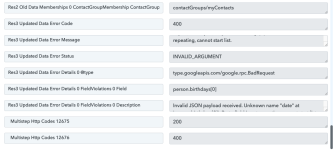
I am sending data from Lead Connector to Pabbly and from Pabbly to Google Contacts.
Right now when I update a field in Lead Connector the automation is supposed to kick in and that works, but when it comes to Pabbly and the data wants to get sent to Google Contacts it creates a duplicate contact. I have created a router but the router keeps creating a new contact even though it is a field within that contact that is being updated.
 www.loom.com
Right now when I update a field in Lead Connector the automation is supposed to kick in and that works, but when it comes to Pabbly and the data wants to get sent to Google Contacts it creates a duplicate contact. I have created a router but the router keeps creating a new contact even though it is a field within that contact that is being updated.
Google Contacts Creating new contact
Use Loom to record quick videos of your screen and cam. Explain anything clearly and easily – and skip the meeting. An essential tool for hybrid workplaces.
www.loom.com