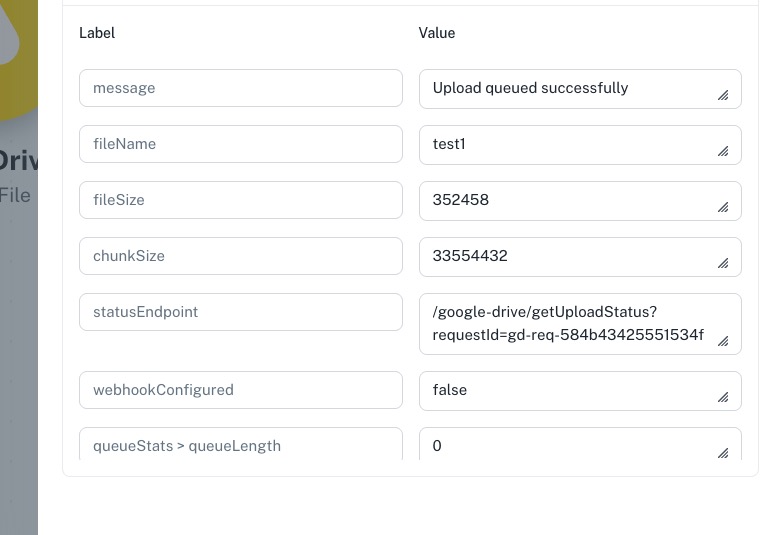
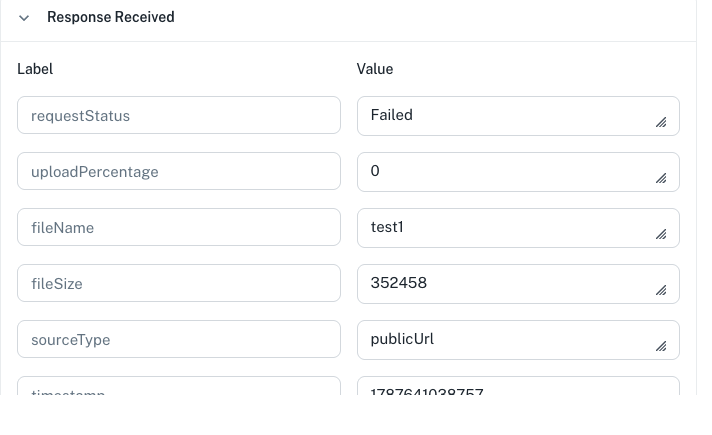
Google Drive after upload. Failed to initialize Drive upload: File not found:
Status: Closed Β· Asked by Bywex on Β· 0 views


Hello,
Thank you for sharing the details.
We request that you please test the workflow using the "Upload a File" option in the Google Drive action step, as shown in the shared screenshot, and check if the file upload works correctly.
Please try this once and let us know the result. If you still face the same issue, share the latest error screenshot and Task History details so we can investigate further.
My first screenshot is with that step
Hello,
Thank you for sharing the update.
Please try establishing a new Google Drive connection in Pabbly Connect and test the workflow again.
The error message "Failed to initialize Drive upload: File not found: 1PL6HsryUN7LlZeCVqKIyIq2WyQuTaFbu." indicates that the file access/authorization is not being validated correctly with the current Google Drive connection.
After creating a new connection, please test the workflow and let us know if you still face any issues.
Youβre not really helpful.
I already did that
Tried in another browser as well
Tried on another workflow
Same thing
You try on your end
Check screen
File gets uploaded, (so authentification is fine)
When checking status, its getting the file name, file size but its saying file not found
tested a new connected account, new workflow, same thing
https://connect.pabbly.com/v2/app/workflow/mapping/IjU3NjcwNTY4MDYzNDA0Mzc1MjZhNTUzNTUxMzci_pc
pass this to the tech team so they can investigate. there are multiple threads about this issue
Hello,
Thank you for sharing the additional details of the workflow.
We reviewed the workflow Task history & found that the Google Drive: Upload a File step is completing successfully, and the upload request status is returned as Queued.
The next step, Google Drive: Get File Upload Status, is showing the upload status as In Progress with 0% upload completion. Since the file upload is still being processed by Google Drive, the file may not be available immediately for the next action.

The Google Drive: Share a File With Anyone step is being executed before the upload is fully completed, which results in the error:
"File not found"
We suggest adding a "Delay For" between the Get File Upload Status and Share a File With Anyone steps or ensuring that the upload status is completed before moving to the sharing step.
the issue is on the next step
The next step, Google Drive: Get File Upload Status, is showing the upload status as
try getting the status.....

its finding the file, its showing the name and size. try uploading a random file and getting the status of the file yourself
Hello,
Thank you for sharing the additional details of the workflow.
To investigate and resolve the issue further, we would like to discuss it with you in a meeting.
Please schedule a convenient time using the link below:
https://www.draftmeet.com/book/lnk_16c18970131505732cac0c9925b30a1c
We will review the workflow with you and proceed with the necessary troubleshooting during the meeting.
it doesn't need a meeting. just upload a file, wait 1 min and get its status id.
Hello,
We understand your frustration.
We used the Google Drive β Get File or Folder by ID action to identify the Folder ID from the previous Google Drive β Upload a File step, which is being used to upload the file.
However, the action is returning a "Not Found" error, which indicates that the provided ID may not be correct or the file/folder may not be accessible with the connected Google Drive account.
We request you to please verify the Folder ID and ensure that the file exists and is accessible.
Once confirmed, please try again. If the issue persists, share the latest task history ID, and we will check further.

Started to work
New steps, new folder id.
without copy pasting previous steps
Hello,
Thank you for the update.
We're glad to know that the issue has been resolved after creating the workflow steps again with a new Folder ID instead of copying the previous steps.
Please continue with the updated workflow, and if you face any further issues, feel free to share the details with us.