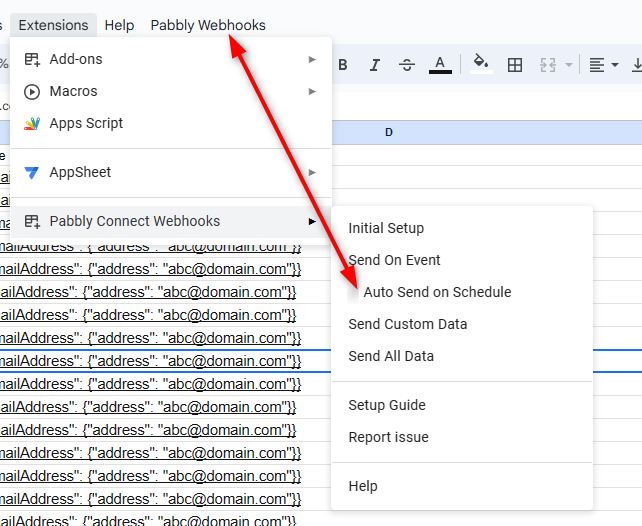
Google Sheet -> Auto Send On Event and Auto Send on Schedule
Status: Open · Asked by Anupam on · 0 views
I am bit confounded by the way google sheet integration works in Pabbly. I found this today and I am truly confounded.
Regardless of how I fill my google sheet, why cant pabbly retrieve the row immediately from google sheet and send it to my target application? If I am filling a row in google sheet from a third party form (as there are some limitations on google form), why do I need to wait for an hour for the form to be visible in my target application? If i cant answer to my customer about whether his submission has come to me or not immediately, what is the use of automation using pabbly?
Please correct me if my above understanding is correct.
My scenario:
- Form is filled in the app FormDesigner.Pro (This app is not in pabbly)
- From FormDesigner.pro , data goes to google spreadsheet via its (FormDesigner's) inbuilt googlesheet integration.
- From GoogleSheet I want data to go to Grist where I analyse the data.
Kindly let me know if for above scenario, is there any way for the googlesheet row to reflect in grist immediately?
Hi @Anupam,
Although not immediate, you can use App script to reduce the waiting time to 1 minute. To assist you in sending new rows every minute, I have included a link to the relevant thread.
https://forum.pabbly.com/threads/google-sheets-1-minute-trigger-send-new-rows-in-every-1-minute.12954/
Thank you for your reply. How reliable is this process? Can i be sure that data will surely go to the apps?
The app script will work fine but please make sure if you are using the app script, you haven't opted for "Send On Event" or "Auto Send on Schedule" option.