Google Sheet Integration - When will it fire?
Status: Closed · Asked by hmba2 on · 0 views
In google sheet Integrations, it says, the trigger will be sent once every hour. Why so late? 
Also, what does "Send on Schedule" option will do? Will it set of trigger once every hour? or will it become sooner? What if I dont select this option? Will no data be sent? what would be the frequency then?
I dont know what to expect and hence I am not able to test. Nor I can set clear expectations to customers who have just filled the form.
Please let me know the exact thing I can expect by default with a google sheet integration (which gets filled by a tool other than google forms). When will it fire naturally?
Second, what is the impact of enabling "Send on Schedule" option?
Thanks!
I have filled a tally form. How long should I wait to see if the integration will fire or not? 1 hour? is there no better way to know for sure that integration will fire? or am I missing something?
In google sheet Integrations, it says, the trigger will be sent once every hour. Why so late?
[IMG alt="1714446584455.png"]https://forum.pabbly.com/attachments/1714446584455-png.41590/[/IMG]
Also, what does "Send on Schedule" option will do? Will it set of trigger once every hour? or will it become sooner? What if I dont select this option? Will no data be sent? what would be the frequency then?
I dont know what to expect and hence I am not able to test. Nor I can set clear expectations to customers who have just filled the form.
Please let me know the exact thing I can expect by default with a google sheet integration (which gets filled by a tool other than google forms). When will it fire naturally?
Second, what is the impact of enabling "Send on Schedule" option?
Thanks!
I have filled a tally form. How long should I wait to see if the integration will fire or not? 1 hour? is there no better way to know for sure that integration will fire? or am I missing something?
Now it is more than an hour and it has not fired. I should not be waiting for an hour to know if a workflow will fire or not. Got to be something I am missing. Please help!
Hey @hmba2
Let me clarify your concerns one by one.
Regarding your inquiry about the Google Sheet, you'll need to add the Google Sheet extension in order to trigger the Google Sheet in Pabbly Connect.
While setting up the Google Sheets, if you are getting the data from the Google Application or you are feeding the data manually then you can only use "Send On Event" and if the data is coming from a third-party application then you might need to select "Auto Send On Schedule" and "Send on Schedule" which will take exactly 1 hr to forward it.
Also, check whether the data was getting filled till your triggering column or not.
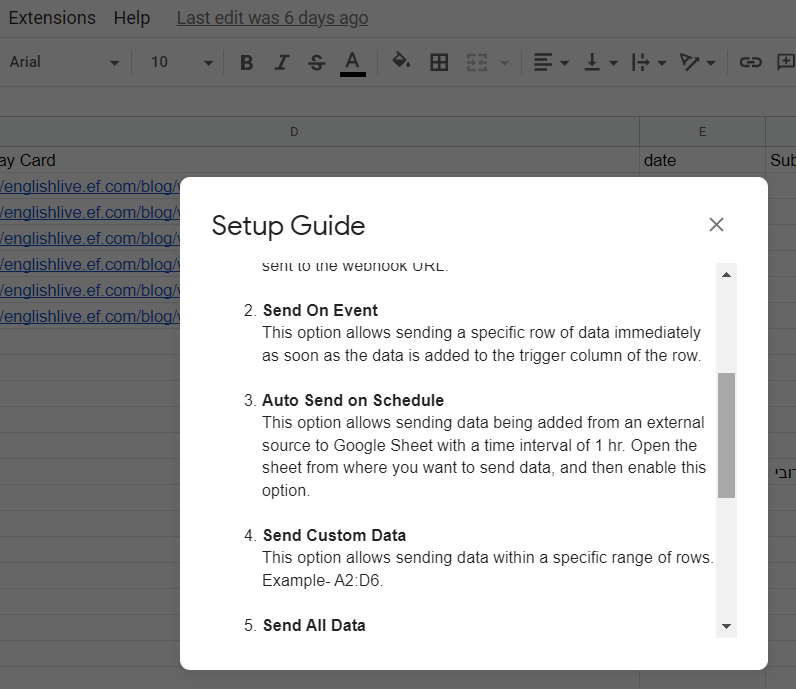
To reduce the trigger interval time from 1 hour to 1 minute, you'll need to add an App Script into your Google Sheet. This script will change the triggering frequency accordingly.
Please refer to the following threads to learn how to set up the App Script in your Google Sheet to trigger it every 1 minute:
Here is the App Script:
https://forum.pabbly.com/threads/google-sheets-1-minute-trigger.12927/
You can read this document to understand how you can add the app script to your Google Sheets.
thanks. this info should be available below the webhook section along with other text. will reduce such queries.
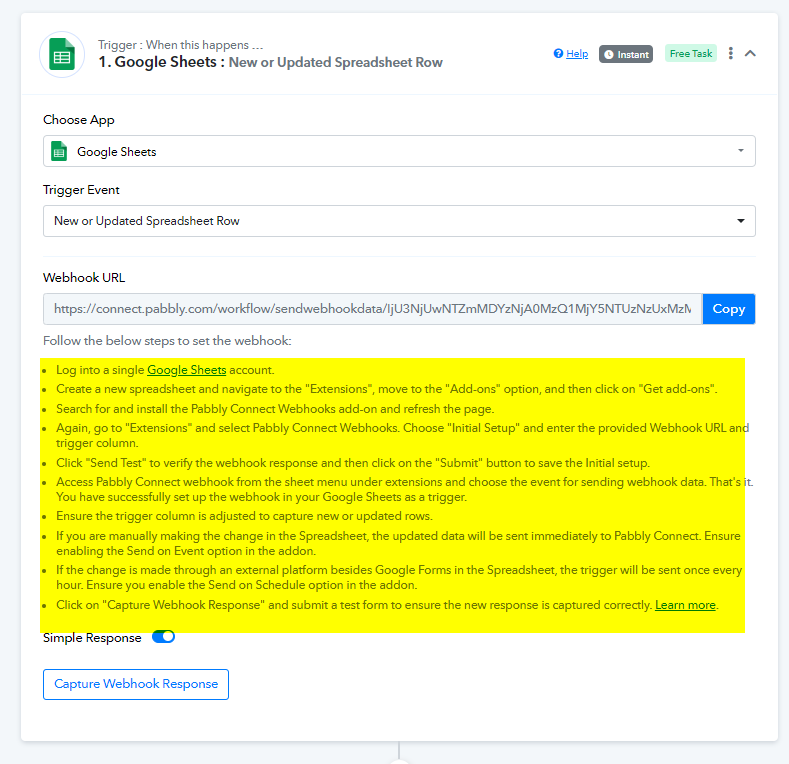
It is mentioned in the help text within the Google Sheet trigger. Please refer to the screenshot below for clarification.
Additionally, we will provide feedback to our team for further updates.
 33333333333333333