Hi,
I have a workflow where my goal is to reminder my customer to attend appointment
The summary of my workflow is below :
Schedule Every 1 Hour > Google Sheets (Get Rows) > Iterator (For Loop) > Google Sheet Lookup Rows > Current Timestamps > Router
Router > Equal Date > Filter > Wabot > Google Sheet Update Cell
Would anyone tell me the flaws or any improvement of my workflow?
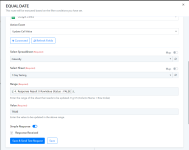
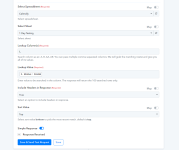
I am attaching images as for my Google Sheet Lookup and Update.
What I want is the workflow will check the Google Sheets row by row, and if the data is matched, it will turn the status from FALSE to TRUE, then go to another rows.
In another case, if go through the row and the data is not matched , it won't change the status of FALSE to TRUE, instead will go to the next rows and continue checking.
This flow will be repeated on its own every 1 hour.
Please share any wisdom that I can implement. Thank you.
I have a workflow where my goal is to reminder my customer to attend appointment
The summary of my workflow is below :
Schedule Every 1 Hour > Google Sheets (Get Rows) > Iterator (For Loop) > Google Sheet Lookup Rows > Current Timestamps > Router
Router > Equal Date > Filter > Wabot > Google Sheet Update Cell
Would anyone tell me the flaws or any improvement of my workflow?
I am attaching images as for my Google Sheet Lookup and Update.
What I want is the workflow will check the Google Sheets row by row, and if the data is matched, it will turn the status from FALSE to TRUE, then go to another rows.
In another case, if go through the row and the data is not matched , it won't change the status of FALSE to TRUE, instead will go to the next rows and continue checking.
This flow will be repeated on its own every 1 hour.
Please share any wisdom that I can implement. Thank you.