GSheet: Router: Not Working
Status: Closed · Asked by digitaldivi on · 0 views
Dear All,
Below is my work flow:
We have a internal form (Fluent Form) for lead registration.
Whenever the data is entered in the Fluent form, data publishes to Google Sheet.
Using pabbly connect, As the Google Sheet is filled, router should send the data to different email ID, based on the criteria set.
It was running fine on Initial setup. It is not working on 'Send on Event'
Trigger is not working to make it work. This is very important for me.
Pls guide
Thank you
Regards
Krishna M
Router is executing the task, only if i enter the details manually but not on automation.
anyone pls guide
Hey @digitaldivi !
If the data are added inside the Google Sheet through a third-party application, then put a tick on both "Send On Event" and "Auto Send on Schedule" in your Google Sheet add-on-
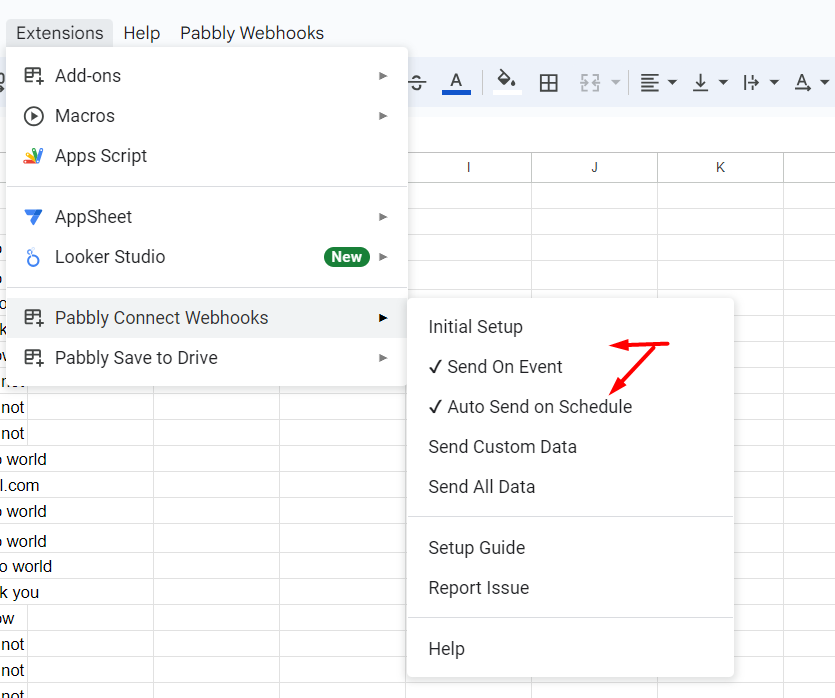
The data will trigger inside the workflow in a time frame of 1hr, as this is a limitation from Google Sheets when a third party is used to add data.
You can lower the time to 1min by following this forum thread- https://forum.pabbly.com/threads/google-sheets-1-minute-trigger-send-new-rows-in-every-1-minute.12954/
This will work for you further.
It worked.
Thanks for your support!!