

• Instructions to Ask a Question

    For any assistance, please click the "Ask a Question" button and select the Pabbly product for which you require support.

    We offer seven comprehensive applications designed to help you efficiently manage and grow your business:

    Our support team endeavors to respond within 24 business hours (Monday to Friday, 10:00 AM to 6:00 PM IST). We appreciate your understanding and patience.

    🖤 BLACK FRIDAY DEALS ARE NOW LIVE! 🖤

    🔥 Enjoy an exclusive 10% discount on our LTD Plan — first-time ever offer!

    🚀 Unlock the Pabbly Plus Unlimited Yearly Plan and get unlimited access to every Pabbly application at a truly unbeatable Black Friday price.

    👉 Grab the Black Friday Offer

How can I Convert Amazon Order Csv file(In Google Drive) to Zoho book Format Csv File

Sreejith

Member
Your Workflow URL
https://connect.pabbly.com/workflow/mapping/IjU3NjYwNTY0MDYzMTA0M2Q1MjY5NTUzNTUxM2Ei_pc
Consent to Access & Modify
I authorize Pabbly Support to log in to my account and make changes to the specified workflow for troubleshooting.
Dear Pabbly ,

I get Sales report from amazon in Csv format & I add that file in Google drive then Read from Pabbly & that Data I want create a new csv file in Zoho book format

is it possible?
or
How can I Send the Amazon Order Data in to Zoho book .

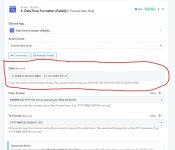
I created a workflow but I got stucked at time formator in Amazon csv file Date like :31-10-2025 19:37
I don't know this workflow works or not?
please guide me
 

Attachments

  • Screenshot 2025-11-16 214937.jpg
    Screenshot 2025-11-16 214937.jpg
    117 KB · Views: 23

ArshilAhmad

Well-known member
Staff member
Hi @Sreejith,

We have changed the From Format in your Date/Time Formatter, which seems to have fixed your issue.
1763311452114.png


There is no endpoint in Zoho Books API documentation which allows you to directly upload CSV to Zoho Books.


===========================================================================


The way you have set up your current workflow, it looks like you will upload a new CSV file to your Google Drive each time a new order is created in your Amazon account (different spreadsheets for different orders). You then want to use 'Get Row(s)' action step to fetch the order details and create a new sales invoice in Zoho Books. If this is your use case, then you have set up the workflow correctly. Just make sure you map the Spreadsheet ID in the 'Get Row(s)' action step from your trigger step.
1763312211074.png
 

Sreejith

Member
Thank you for your Response.
I will upload the order detail at the end of the Month in a single sheet, It's not possible upload each time.
My question is Will Pabbly excute each row & coloum and create multiple order to zoho book?

for example if i have 10 order in csv file
 

Preeti Paryani

Well-known member
Staff member
Hello @Sreejith,

Thank you for explaining your use case. With your current setup, the workflow will not iterate through each row of the Google Sheet to create multiple invoices in Zoho Books.

To achieve this, you will need to:

  1. Capture the response from the Google Sheets – Get Rows action in Advanced Format.
  2. Add an Iterator step after the Get Rows action.
  3. Inside the Iterator loop, use the Date/Time Formatter to format the date for each row.
  4. After that, use the Zoho Books – Create Sales Invoice action.
This structure will allow Pabbly to create one Zoho Books invoice per row in your CSV/Google Sheet.

Please make sure to test this workflow with a sample CSV before uploading your full monthly file.
 
Top