

• Instructions to Ask a Question

    For any assistance, please click the "Ask a Question" button and select the Pabbly product for which you require support.

    We offer seven comprehensive applications designed to help you efficiently manage and grow your business:

    Our support team endeavors to respond within 24 business hours (Monday to Friday, 10:00 AM to 6:00 PM IST). We appreciate your understanding and patience.

  • Due to Holi celebrations, our team will have limited availability. While we’ll continue to monitor threads, responses may be slightly delayed.

How can we edit the Attribution Source tag?

Uyen

Member
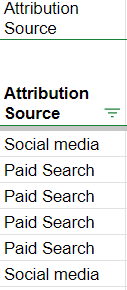
Right now, whenever a lead comes in from GHL, it will tag the lead as:
  • Social Media - if the lead comes from a FB ad.
  • Paid Search - if the lead comes from a Google ad.
We want to change Social Media -> Facebook. Paid Search -> Google.

How can we edit the Attribution Source tag at GHL or make changes on Pabbly Connect to show "Facebook" or "Google"?

Thank you.
 

Attachments

  • Attribution source.png
    Attribution source.png
    4.4 KB · Views: 129
A

Arshita

Guest
Hey @Uyen

Kindly provide us the workflow name in which you are getting issues so we can check on it and guide you further.
 
A

Arshita

Guest
Hey @Uyen

Thank you for sharing the workflow.

Could you please provide a more detailed explanation of on your concern with a short video or screenshots?

This will help us better understand your issue and provide you with the correct solution.
 
Top